Showing posts with label apply(). Show all posts

Monday, June 18, 2012

Example 9.35: Discrete randomization and formatted output

A colleague asked for help with randomly choosing a kid within a family. This is for a trial in which families are recruited at well-child visits, but in each family only one of the children having a well-child visit that day can be in the study. The idea is that after recruiting the family, the research assistant needs to choose one child, but if they make that choice themselves, the children are unlikely to be representative. Instead, we'll allow them to make a random decision through an easily used slip that can be put into sealed envelopes. The envisioned process is that the RA will recruit the family, determine the number of eligible children, then open the envelope to find out which child was randomly selected.

One thought here would be to generate separate stacks of envelopes for each given family size, and have the research assistant open an envelope from the appropriate stack. However, this could be logistically challenging, especially since the RAs will spend weeks away from the home office. Instead, we'll include all plausible family sizes on each slip of paper. It seems unlikely that more than 5 children in a family will have well-child visits on the same day.

SAS
We'll use the SAS example to demonstrate using SAS macros to write SAS code, as well as showing a plausible use for SAS formats (section 1.4.12) and making use of proc print.

/* the following macro will write out equal probabilities for selecting
each integer between 1 and the argument, in the format needed for the
rand function. E.g., if the argument is 3,
it will write out
1/3,1/3,1/3
*/

%macro tbls(n);
%do i = 1 %to &n;
1/&n %if &i < &n %then ,
%end;
%mend tbls;

/* then we can use the %tbls macro to create the randomization
via rand("TABLE") (section 1.10.4). */
data kids;
do family = 1 to 10000;
nkids = 2; chosen = rand("TABLE",%tbls(2)); output;
nkids = 3; chosen = rand("TABLE",%tbls(3)); output;
nkids = 4; chosen = rand("TABLE",%tbls(4)); output;
nkids = 5; chosen = rand("TABLE",%tbls(5)); output;
end;
run;

/* check randomization */
proc freq data = kids;
table nkids * chosen / nocol nopercent;
run;

nkids chosen

Frequency|
Row Pct | 1| 2| 3| 4| 5| Total
---------+--------+--------+--------+--------+--------+
2 | 50256 | 49744 | 0 | 0 | 0 | 100000
| 50.26 | 49.74 | 0.00 | 0.00 | 0.00 |
---------+--------+--------+--------+--------+--------+
3 | 33429 | 33292 | 33279 | 0 | 0 | 100000
| 33.43 | 33.29 | 33.28 | 0.00 | 0.00 |
---------+--------+--------+--------+--------+--------+
4 | 25039 | 24839 | 25245 | 24877 | 0 | 100000
| 25.04 | 24.84 | 25.25 | 24.88 | 0.00 |
---------+--------+--------+--------+--------+--------+
5 | 19930 | 20074 | 20188 | 20036 | 19772 | 100000
| 19.93 | 20.07 | 20.19 | 20.04 | 19.77 |
---------+--------+--------+--------+--------+--------+
Total 128654 127949 78712 44913 19772 400000

Looks pretty good. Now we need to make the output usable to the research assistants, by formatting the results into English. We'll use the same format for each number of kids. This saves some keystrokes now, but may possibly cause the RAs some confusion-- it means that we might refer to the "4th oldest" of 4 children, rather than the "youngest". We could fix this using a different format for each number of children, analogous to the R version below.

proc format;
value chosen
1 = "oldest"
2 = '2nd oldest'
3 = '3rd oldest'
4 = '4th oldest'
5 = '5th oldest';
run;

/* now, make a text variable the concatenates (section 1.4.5) the variables
and some explanatory text */
data k2;
set kids;
if nkids eq 2 then
t1 = "If there are " || strip(nkids) ||" children then choose the " ||
strip(put(chosen,chosen.)) || " child.";
else
t1 = " " || strip(nkids) ||" ________________________ " ||
strip(put(chosen,chosen.));
run;

/* then we print. Notice the options to print in plain text, shorten the
page length and width, and remove the date and page number from the SAS output, as
well as in the proc print statement to remove the observation number and
show the line number, with a few other tricks */
options nonumber nodate ps = 60 ls = 68;
OPTIONS FORMCHAR="|----|+|---+=|-/\<>*";
proc print data = k2 (obs = 3) noobs label sumlabel;
by family;
var t1;
label t1 = '00'x family = "Envelope";
run;

---------------------------- Envelope=1 ----------------------------


If there are 2 children then choose the 2nd oldest child.
3 ________________________ 3rd oldest
4 ________________________ 4th oldest
5 ________________________ 5th oldest


---------------------------- Envelope=2 ----------------------------


If there are 2 children then choose the 2nd oldest child.
3 ________________________ oldest
4 ________________________ oldest
5 ________________________ 3rd oldest


---------------------------- Envelope=3 ----------------------------


If there are 2 children then choose the 2nd oldest child.
3 ________________________ 2nd oldest
4 ________________________ 3rd oldest
5 ________________________ 2nd oldest


R
For R, we leave some trial code in place, to demonstrate how one might discover, test, and build R code in this setting. Most results have been omitted.

sample(5, size = 1)
# choose a (discrete uniform) random integer between 1 and 5

apply(matrix(2:5),1,sample,size=1)
# choose a random integer between 1 and 2, then between 1 and 3, etc.,
# using apply() to repeat the call to sample() with different maximum number
# apply() needs a matrix or array input
# result of this is the raw data needed for one family

replicate(3,apply(matrix(2:5),1,sample,size=1))
# replicate() is in the apply() family and just repeats the
# function n times

[,1] [,2] [,3]
[1,] 2 1 2
[2,] 2 1 2
[3,] 2 2 2
[4,] 3 5 4

Now we have the raw data for the envelopes. Before formatting it for printing, let's check it to make sure it works correctly.

test=replicate(100000, apply(matrix(2:5), 1, sample, size=1))
apply(test, 1, summary)
[,1] [,2] [,3] [,4]
Min. 1.0 1 1.000 1.000
1st Qu. 1.0 1 1.000 2.000
Median 1.0 2 2.000 3.000
Mean 1.5 2 2.492 3.003
3rd Qu. 2.0 3 3.000 4.000
Max. 2.0 3 4.000 5.000
# this is not so helpful-- need the count or percent for each number
# this would be the default if the data were factors, but they aren't
# check to see if we can trick summary() into treating these integers
# as if they were factors
methods(summary)
# yes, there's a summary() method for factors-- let's apply it
# there's also apply(test,1,table) which might be better, if you remember it
apply(test, 1, summary.factor)
[[1]]
1 2
50025 49975

[[2]]
1 2 3
33329 33366 33305

[[3]]
1 2 3 4
25231 25134 24849 24786

[[4]]
1 2 3 4 5
19836 20068 20065 20022 20009
# apply(test,1,table) will give similar results, if you remember it

Well, that's not too pretty, but it's clear that the randomization is working. Now it's time to work on formatting the output.

mylist=replicate(5, apply(matrix(2:5), 1, sample, size=1))
# brief example data set

# We'll need to use some formatted values (section 1.14.12), as in SAS.
# Here, we'll make new value labels for each number of children,
# which will make the output easier to read. We add in an envelope
# number and wrap it all into a data frame.
df = data.frame(envelope = 1:5,
twokids=factor(mylist[1,],1:2,labels=c("youngest","oldest")),
threekids=factor(mylist[2,],1:3,labels=c("youngest", "middle", "oldest")),
fourkids=factor(mylist[3,],1:4,labels=c("youngest", "second youngest",
"second oldest", "oldest")),
fivekids=factor(mylist[4,],1:5,labels=c("youngest", "second youngest",
"middle", "second oldest", "oldest"))
)

# now we need a function to take a row of the data frame and make a single slip
# the paste() function (section 1.4.5) puts together the fixed and variable
# content of each row, while the cat() function will print it without quotes
slip = function(kidvec) {
cat(paste("------------- Envelope", kidvec[1], "------------------"))
cat(paste("\nIf there are", 2:5, " children, select the", kidvec[2:5],"child"))
cat("\n \n \n")
}

# test it on one row
slip(df[1,])

# looks good-- now we can apply() it to each row of the data frame
apply(df, 1, slip)

------------- Envelope 1 ------------------
If there are 2 children, select the youngest child
If there are 3 children, select the youngest child
If there are 4 children, select the second youngest child
If there are 5 children, select the youngest child


------------- Envelope 2 ------------------
If there are 2 children, select the youngest child
If there are 3 children, select the youngest child
If there are 4 children, select the second oldest child
If there are 5 children, select the middle child


------------- Envelope 3 ------------------
If there are 2 children, select the youngest child
If there are 3 children, select the youngest child
If there are 4 children, select the youngest child
If there are 5 children, select the second youngest child

# and so forth

# finally, we can save the result in a file with
# capture.output()
capture.output(apply(df,1,slip), file="testslip.txt")


An unrelated note about aggregators:
We love aggregators! Aggregators collect blogs that have similar coverage for the convenience of readers, and for blog authors they offer a way to reach new audiences. SAS and R is aggregated by R-bloggers, PROC-X, and statsblogs with our permission, and by at least 2 other aggregating services which have never contacted us. If you read this on an aggregator that does not credit the blogs it incorporates, please come visit us at SAS and R. We answer comments there and offer direct subscriptions if you like our content. In addition, no one is allowed to profit by this work under our license; if you see advertisements on this page, the aggregator is violating the terms by which we publish our work.

Monday, May 21, 2012

Example 9.32: Multiple testing simulation

In examples 9.30 and 9.31 we explored corrections for multiple testing and then extracting p-values adjusted by the Benjamini and Hochberg (or FDR) procedure. In this post we'll develop a simulation to explore the impact of "strong" and "weak" control of the family-wise error rate offered in multiple comparison corrections. Loosely put, weak control procedures may fail when some of the null hypotheses are actually false, in that the remaining (true) nulls may be rejected more than the nominal proportion of times.

For our simulation, we'll develop flexible code to generate some p-values from false nulls and others from true nulls. We'll assume that the true nulls have p-values distributed uniform (0,1); the false nulls will have p-values distributed uniform with a user-determined maximum. We'll also allow the number of tests overall and the number of false nulls to be set.

SAS
In SAS, a macro does the job. It accepts the user parameters described above, then generates false and true nulls for each desired simulation. With the data created, we can use proc multtest to apply the FDR procedure, with the ODS system saving the results. Note how the by statement allows us to replicate the analysis for each simulated set of p-values without creating a separate data set for each one. (Also note that we do not use proc sort before that by statement-- this can be risky, but works fine here.)

%macro fdr(nsims=1, ntests = 20, nfalse=10, howfalse=.01);
ods select none;
data test;
do sim = 1 to &nsims;
do i = 1 to &ntests;
raw_p = uniform(0) *
( ((i le &nfalse) * &howfalse ) + ((i gt &nfalse) * 1 ) );
output;
end;
end;
run;

ods output pvalues = __pv;
proc multtest inpvalues=test fdr;
by sim;
run;

With the results in hand, (still within the macro) we need to do some massaging to make the results usable. First we'll recode the rejections (assuming a 0.05 alpha level) so that non-rejections are 0 and rejections are 1/number of tests. That way we can just sum across the results to get the proportion of rejections. Next, we transform the data to get each simulation in a row (section 1.5.4). (The data output from proc multtest has nsims*ntests rows. After transposing, there are nsims rows.) Finally, we can sum across the rows to get the proportion of tests rejected in each simulated family of tests. The results are shown in a table made with proc freq.

data __pv1;
set __pv;
if falsediscoveryrate lt 0.05 then fdrprop = 1/&ntests;
else fdrprop =0;
run;

proc transpose data = __pv1 (keep =sim fdrprop) out = pvals_a;
by sim; run;

data pvals;
set pvals_a;
prop = sum(of col1 - col&ntests);
run;
ods select all;

proc freq data = pvals; tables prop; run;
%mend fdr;

%fdr(nsims = 1000, ntests = 20, nfalse = 10, howfalse=.001);

Cumulative Cumulative
prop Frequency Percent Frequency Percent
---------------------------------------------------------
0.5 758 75.80 758 75.80
0.55 210 21.00 968 96.80
0.6 27 2.70 995 99.50
0.65 5 0.50 1000 100.00

So true nulls were rejected 24% of the time, which seems like a lot. Multiple comparison procedures with "strong" control of the familywise error rate will reject them only 5% of the time. Building this simulation as a macro facilitates exploring the effects of the multiple comparison procedures in a variety of settings.

R
As in example 9.31, the R code is rather simpler, though perhaps a bit opaque. To make the p-values, we make them first for all of tests with the false, then for all of the tests with the true nulls. The matrix function reads these in by column, by default, meaning that the first nfalse columns get the nsims*nfalse observations. The apply function generates the FDR p-values for each row of the data set. The t() function just transposes the resulting matrix so that we get back a row for each simulation. As in the SAS version, we'll count each rejection as 1/ntests, and non-rejections as 0; we do this with the ifelse() statement. Then we sum across the simulations with another call to apply() and show the results with a simple table.

checkfdr = function(nsims=1, ntests=100, nfalse=0, howfalse=0.001) {
raw_p = matrix(c(runif(nfalse * nsims) * howfalse,
runif((ntests-nfalse) * nsims)), nrow=nsims)
fdr = t(apply(raw_p, 1, p.adjust, "fdr"))
reject = ifelse(fdr<.05, 1/ntests,0)
prop = apply(reject, 1, sum)
prop.table(table(prop))
}

> checkfdr(nsims=1000, ntests=20, nfalse=10, howfalse=.001)
prop
0.5 0.55 0.6 0.65
0.755 0.210 0.032 0.003

The results are reassuringly similar to those from SAS. In this R code, it's particularly simple to try a different test-- just replace "fdr" in the p.adjust() call. Here's the result with the Hochberg test, which has strong control.

checkhoch = function(nsims=1, ntests=100, nfalse=0, howfalse=0.001) {
pvals = matrix(c(runif(nfalse * nsims) * howfalse,
runif((ntests-nfalse) * nsims)), nrow=nsims)
hochberg = t(apply(pvals, 1, p.adjust,"hochberg"))
reject = ifelse(hochberg<.05,1/ntests,0)
prop = apply(reject, 1, sum)
prop.table(table(prop))
}

> checkhoch(nsims=1000, ntests=20, nfalse=10, howfalse=.001)
prop
0.5 0.55 0.6
0.951 0.046 0.003

With this procedure one or more of the true nulls is rejected an appropriate 4.9% of the time. For the most part, we feel more comfortable using multiple testing procedures with "strong control".


An unrelated note about aggregators
We love aggregators! Aggregators collect blogs that have similar coverage for the convenience of readers, and for blog authors they offer a way to reach new audiences. SAS and R is aggregated by R-bloggers, PROC-X, and statsblogs with our permission, and by at least 2 other aggregating services which have never contacted us. If you read this on an aggregator that does not credit the blogs it incorporates, please come visit us at SAS and R. We answer comments there and offer direct subscriptions if you like our content. In addition, no one is allowed to profit by this work under our license; if you see advertisements on this page, the aggregator is violating the terms by which we publish our work.

Monday, April 9, 2012

Example 9.26: More circular plotting


SAS's Rick Wicklin showed a simple loess smoother for the temperature data we showed here. Then he came back with a better approach that does away with edge effects. Rick's smoothing was calculated and plotted on a cartesian plane. In this entry we'll explore another option or two for smoothing, and plot the results on the same circular plot.

Since Rick is showing SAS code, and Robert Allison has done the circular plot (plot) (code), we'll stick to the R again for this one.

R
We'll start out by getting the data and setting it up as we did earlier. We add the year back into the matrix t3old because it'll be needed later.

temp1 = read.table("http://academic.udayton.edu/kissock/http/Weather/
gsod95-current/NYALBANY.txt")
leap = c(0,1,0,0,0,1,0,0,0,1,0,0,0,1,0,0,0,1)
days = rep(365,18) + leap
monthdays = c(31,28,31,30,31,30,31,31,30,31,30,31)
temp1$V3 = temp1$V3 - 1994

yearpart = function(daytvec,yeardays,mdays=monthdays){
part = (sum(mdays[1:(daytvec[1]-1)],(daytvec[1] > 2) * (yeardays[daytvec[3]]==366))
+ daytvec[2] - ((daytvec[1] == 1)*31)) / yeardays[daytvec[3]]
return(part)
}

temp2 = as.matrix(temp1)

radians = 2* pi * apply(temp2, 1, yearpart, days, monthdays)

t3old = matrix(c(temp1$V4[temp1$V4 != -99 & ((temp1$V3 < 18) )],
radians[temp1$V4 != -99 & ((temp1$V3 < 18) )],
temp1$V3[temp1$V4 != -99 & ((temp1$V3 < 18) )]), ncol=3)


t3now= matrix(c(temp1$V4[temp1$V4 != -99 & ((temp1$V3 == 18) |
(temp1$V3 == 17 & temp1$V1 == 12))],
radians[temp1$V4 != -99 & ((temp1$V3 == 18) |
(temp1$V3 == 17 & temp1$V1 == 12))]), ncol=2)

library(plotrix)
radial.plot(t3old[,1],t3old[,2],rp.type="s", point.col = 2, point.symbols=46,
clockwise=TRUE, start = pi/2, label.pos = (1:12)/6 * (pi),
radial.lim=c(-20,10,40,70,100), labels=c("February 1","March 1",
"April 1","May 1","June 1","July 1","August 1","September 1",
"October 1","November 1","December 1","January 1"))

radial.plot(t3now[,1],t3now[,2],rp.type="s", point.col = 1, point.symbols='*',
clockwise=TRUE, start = pi/2, add=TRUE, radial.lim=c(-20,10,40,70,100))

If you didn't happen to see the update on the previous entry, note that the radial.lim option makes the axes for the added points match those for the initial plot. Otherwise, the added points plotted lower than they appeared, making the recent winter look cooler.

Rick started with a smoother, but often cyclic data can be fit well parametrically, using the sine and cosine of the cycle length as the covariates. With the data set up in radians already, this is trivially simple. The predicted values for the data can be retrieved with the fitted() function (e.g., section 3.7.3), which works with many model objects. These can then be fed into the radial.plot() function with rp.type="p" to make a line plot. The result is shown at the top-- the parametric fit appears to do a good job. Of course, you can fit on a square plot very easily with the plot() function, with result shown below.

simple = lm(t3old[,1] ~ sin(t3old[,2]) + cos(t3old[,2]))

radial.plot(fitted(simple),t3old[,2],rp.type="p", clockwise=TRUE,
start = pi/2, add=TRUE, radial.lim=c(-20,10,40,70,100))

plot(t3old[,1] ~ t3old[,2], pch='.')
lines(t3old[,2],fitted(simple))


I didn't change the order of the data, so the line comes back to the beginning of the plot at the end of the year.

Adding a smoothed fit is nearly as easy. Just replace the lm() call with a loess() (section 5.2.6) call. The new line is added on top of the old one, to see just how they differ. The result is show below.

simploess = loess(t3old[,1] ~ t3old[,2])
radial.plot(fitted(simploess),t3old[,2],rp.type="p", line.col="blue",
clockwise=TRUE, start = pi/2, add=TRUE, radial.lim=c(-20,10,40,70,100))


The parametric fit is pretty good, but misses the sharp dip seen in January, and the fit in the late fall and early spring appear to be slightly affected.

But this approach stacks up all the data from 18 years. It might be more appropriate to stretch the data across the calendar time, fit the smoothed line to that, and then wrap it around the circular plot. To do this, we'll need to add the year back into the radians. Finding an acceptable smoother was a challenge-- the smooth.spline() function used here was adequate, but as the second plot below shows, it misses some highs and lows. Adding the smoothed curve to the plot is as easy as before, however. The plot with smoothing by year is immediately below.

radyear = t3old[,2] + (2 * pi * t3old[,3])
better = smooth.spline(y=t3old[,1],x= radyear, all.knots=TRUE,spar=1.1)

radial.plot(fitted(better),t3old[,2],rp.type="p", line.col="green",
clockwise=TRUE, start = pi/2, add=TRUE, radial.lim=c(-20,10,40,70,100))

plot(t3old[,1] ~ radyear, pch = '.')
lines(better)


The relatively poor fit seen below makes the new (green) line at least as poor as the parametric fit. The extra variability in the winter is reflected in distinct lines in the winter. Rick's approach, to fit the data lumping across years, seems to be the best for fitting, though it's easier to see the heteroscedaticity in the ciruclar plot. But however you slice it, this winter has had an unusual number of very warm days.


An unrelated note about aggregators
We love aggregators! Aggregators are meta-blogs that collect content from blogs that have similar coverage, for the convenience of readers. For blog authors they offer a way to reach new audiences. SAS and R is aggregated by R-bloggers and PROC-X with our permission, and by at least 2 other aggregating services which have never contacted us. If you read this on an aggregator that does not credit the blogs it incorporates, please come visit us at SAS and R. We answer comments there and offer direct subscriptions if you like our content. In addition, no one is allowed to profit by this work under our license; if you see advertisements on this page, the aggregator is violating the terms by which we publish our work.

Monday, April 2, 2012

Example 9.25: It's been a mighty warm winter? (Plot on a circular axis)


Updated (see below)


People here in the northeast US consider this to have been an unusually warm winter. Was it?

The University of Dayton and the US Environmental Protection Agency maintain an archive of daily average temperatures that's reasonably current. In the case of Albany, NY (the most similar of their records to our homes in the Massachusetts' Pioneer Valley), the data set as of this writing includes daily records from 1995 through March 12, 2012.

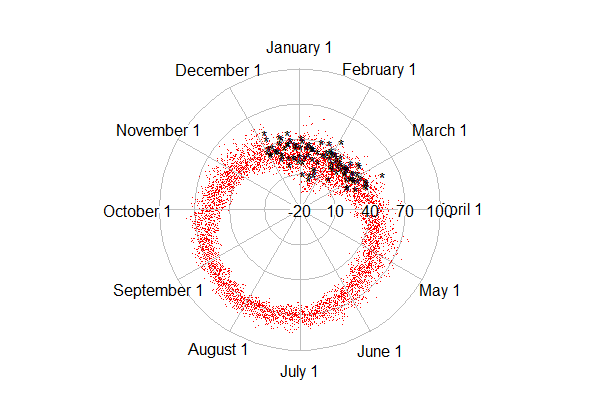
In this entry, we show how to use R to plot these temperatures on a circular axis, that is, where January first follows December 31st. We'll color the current winter differently to see how it compares. We're not aware of a tool to enable this in SAS. It would most likely require a bit of algebra and manual plotting to make it work.

R
The work of plotting is done by the radian.plot() function in the plotrix package. But there are a number of data management tasks to be employed first. Most notably, we need to calculate the relative portion of the year that's elapsed through each day. This is trickier than it might be, because of leap years. We'll read the data directly via URL, which we demonstrate in Example 8.31. That way, when the unseasonably warm weather of last week is posted, we can update the plot with trivial ease.

library(plotrix)
temp1 = read.table("http://academic.udayton.edu/kissock/http/
Weather/gsod95-current/NYALBANY.txt")
leap = c(0,1,0,0,0,1,0,0,0,1,0,0,0,1,0,0,0,1)
days = rep(365, 18) + leap
monthdays = c(31,28,31,30,31,30,31,31,30,31,30,31)
temp1$V3 = temp1$V3 - 1994

The leap, days, and monthdays vectors identify leap years, count the corrrect number of days in each year, and have the number of days in the month in non-leap years, respectively. We need each of these to get the elapsed time in the year for each day. The columns in the data set are the month, day, year, and average temperature (in Fahrenheit). The years are renumbered, since we'll use them as indexes later.

The yearpart() function, below, counts the proportion of days elapsed.

yearpart = function(daytvec,yeardays,mdays=monthdays){
part = (sum(mdays[1:(daytvec[1]-1)],
(daytvec[1] > 2) * (yeardays[daytvec[3]]==366))
+ daytvec[2] - ((daytvec[1] == 1)*31)) / yeardays[daytvec[3]]
return(part)
}

The daytvec argument to the function will be a row from the data set. The function works by first summing the days in the months that have passed (,sum(mdays[1:(daytvec[1]-1)]) adding one if it's February and a leap year ((daytvec[1] > 2) * (yeardays[daytvec[3]]==366))). Then the days passed so far in the current month are added. Finally, we subtract the length of January, if it's January. This is needed, because sum(1:0) = 1, the result of which is that that January is counted as a month that has "passed" when the sum() function quoted above is calculated for January days. Finally, we just divide by the number of days in the current year.

The rest is fairy simple. We calculate the radians as the portion of the year passed * 2 * pi, using the apply() function to repeat across the rows of the data set. Then we make matrices with time before and time since this winter started, admittedly with some ugly logical expressions (section 1.14.11), and use the radian.plot() function to make the plots. The options to the function are fairly self-explanatory.

temp2 = as.matrix(temp1)
radians = 2* pi * apply(temp2,1,yearpart,days,monthdays)

t3old = matrix(c(temp1$V4[temp1$V4 != -99 & ((temp1$V3 < 18) | (temp1$V2 < 12))],
radians[temp1$V4 != -99 & ((temp1$V3 < 18) | (temp1$V2 < 2))]),ncol=2)

t3now= matrix(c(temp1$V4[temp1$V4 != -99 &
((temp1$V3 == 18) | (temp1$V3 == 17 & temp1$V1 == 12))],
radians[temp1$V4 != -99 & ((temp1$V3 == 18) |
(temp1$V3 == 17 & temp1$V1 == 12))]),ncol=2)
# from plottrix library
radial.plot(t3old[,1],t3old[,2],rp.type="s", point.col = 2, point.symbols=46,
clockwise=TRUE, start = pi/2, label.pos = (1:12)/6 * (pi),
labels=c("February 1","March 1","April 1","May 1","June 1",
"July 1","August 1","September 1","October 1","November 1",
"December 1","January 1"), radial.lim=c(-20,10,40,70,100))

radial.plot(t3now[,1],t3now[,2],rp.type="s", point.col = 1, point.symbols='*',
clockwise=TRUE, start = pi/2, add=TRUE, radial.lim=c(-20,10,40,70,100))

The result is shown at the top. The dots (point.symbol is like pch so 20 is a point (section 5.2.2) show the older data, while the asterisks are the current winter. An alternate plot can be created with the rp.type="p" option, which makes a line plot. The result is shown below, but the lines connecting the dots get most of the ink and are not what we care about today.

Either plot demonstrates clearly that a typical average temperature in Albany is about 60 to 80 in August and about 10 to 35 in January, the coldest monthttp://www.blogger.com/img/blank.gifh.

Update
The top figure shows that it has in fact been quite a warm winter-- most of the black asterisks are near the outside of the range of red dots. Updating with more recent weeks will likely increase this impression. In the first edition of this post, the radial.lim option was omitted, which resulted in different axes in the original and "add" calls to radial.plot. This made the winter look much cooler. Many thanks to Robert Allison for noticing the problem in the main plot. Robert has made many hundreds of beautiful graphics in SAS, which can be found here. He also has a book. Robert also created a version of the plot above in SAS, which you can find here, with code here. Both SAS and R (not to mention a host of other environments) are sufficiently general and flexible that you can do whatever you want to do-- but varying amounts of expertise might be required.

An unrelated note about aggregators
We love aggregators! Aggregators collect blogs that have similar coverage for the convenience of readers, and for blog authors they offer a way to reach new audiences. SAS and R is aggregated by R-bloggers and PROC-X with our permission, and by at least 2 other aggregating services which have never contacted us. If you read this on an aggregator that does not credit the blogs it incorporates, please come visit us at SAS and R. We answer comments there and offer direct subscriptions if you like our content. In addition, no one is allowed to profit by this work under our license; if you see advertisements on this page, the aggregator is violating the terms by which we publish our work.

Thursday, February 23, 2012

Example 9.21: The birthday "problem" re-examined


The so-called birthday paradox or birthday problem is simply the counter-intutitive discovery that the probability of (at least) two people in a group sharing a birthday goes up surprisingly fast as the group size increases. If the group is only 23 people, there is a 50% chance that two of them share a birthday, and with 40 people it's about 90%. There is an excellent wikipedia page discussing this.

However, this analytically derived probability is based on the assumption that births are equally likely on any day of the year. (It also ignores the occasional February 29th, and any social factors that lead people born at the same time of year to seek like spouses, and so forth.) But this assumption does not appear to be true, as laid out anecdotally and in press.

As noted in the latter link, any disparity in the probability of birth between days will improve the chances of a match. But how much? An analytic solution seems quite complex, even if we approximate the true daily distribution with a constant birth probability per month. Simulation will be simpler. While we're at it, we'll include leap days as well, since February 29th approaches.

SAS

Our approach here is based on the observation that the probability of at least one match among N people is equal to the sum of the probabilities of exactly one match in 2,...,N people. In addition, rather than simulating groups of 2, estimating the probability of a match, and repeating for groups of 3,...,N, we'll keep adding people to a group until we have a match, finding the probability of a match in all group sizes at once.

Here we use arrays (section 1.11.5) to keep track of the number of days in a month and of the people in our group. To reduce computation, we'll check for matches as we add people to the group, and only generate their birthdays if there is not yet a match. We also demonstrate the useful hyphen tool for referring to ranges of variables (1.11.4).

data bd1;
array daysmo [12] _temporary_ (31 28.25 31 30 31 30 31 31 30 31 30 31);
array dob [367] dob1 - dob367; * these variables will hold the birthdays
* the hyphen includes all the variables in the
* sequence

do group = 1 to 10000000; * simulate this many groups;
match = 0; * initialize whether there's a match in this
group, yet;
do i = 1 to 367; * loop through up to 367 subjects... the maximum
possible, obviously;
month = rantbl(0, 31*.0026123, 28*.0026785, 31*.0026838, 30*.0026426,
31*.0026702, 30*.0027424, 31*.0028655, 31*.0028954, 30*.0029407,
31*.0027705, 30*.0026842);
* choose a month of birth, by probabilities reported
in the Science News link, which are daily by month;
day = ceil((4 * daysmo[month] * uniform(0))/4);
* choose a day within the month,
note the trick used to get Leap Days;
dob[i] = mdy(month, day, 1960);
* convert month and day into a day in the year--
1960 is a convenient leap year;
do j = 1 to (i-1) until (match gt 0);
* compare each old person to the new one;
if dob[j] = dob[i] then match = i;
* if there was a match, we needed i people in the
group to make it;
end;
if match gt 0 then leave;
* no need to generate the other 367-i people;
end;
output;
end;
run;

We note here that while we allow up to 367 birthdays before a match, the probability of more than 150 is so infinitesimal that we could save the space and speed up processing time by ignoring it. Now that the groups have been simulated, we just need to summarize and present them. We tabulate how many cases of groups of size N were recorded, generate the simple analytic answer, and merge them.

proc freq data = bd1;
tables match / out=bd2 outcum; * the bd2 data set has the results;
run;

data simpreal;
set bd2;
prob = 1 - ((fact(match) * comb (365,match)) / 365**match);
realprob = cum_freq/10000000;
diff = realprob-prob;
diffpct = 100 * (diff)/prob;
run;

It's easiest to interpret the results by way of a plot. We'll plot the absolute and the relative difference on the same image with two different axes. The axis and symbol statements will make it slightly prettier, and allow us to make 0 appear at the same point on both axes.

axis1 order = (-.75 to .75 by .25) minor = none;
axis2 order = (-.00025 to .00025 by .00005) minor = none;
symbol1 v = dot h = .75 c = blue;
symbol2 font=marker v = U h = .5 c = red;

proc gplot data= simpreal (obs = 89);
plot diffpct * match / vref = 0 vaxis=axis1 legend;
plot2 diff *match/ vaxis = axis2 legend;
run; quit;

The results, shown below, are very clear-- leap day and the disequilibrium in birth month probability does increase the probability of at least one match in any group of a given size, relative to the uniform distribution across days assumed in the analytic solution. But the difference is miniscule in both the absolute and relative scale.

R
Here we mimic the approach used above, but use the apply() function family in place of some of the looping.

dayprobs = c(.0026123,.0026785,.0026838,.0026426,.0026702,.0027424,.0028655,
.0028954,.0029407,.0027705,.0026842,.0026864)
daysmo = c(31,28,31,30,31,30,31,31,30,31,30,31)
daysmo2 = c(31,28.25,31,30,31,30,31,31,30,31,30,31)
# need both: the former is how the probs are reported,
# while the latter allows leap days

moprob = daysmo * dayprobs

With the monthly probabilities established, we can sample a birth month for everyone, and then choose a birth day within month. We use the same trick as above to allow birth days of February 29th. Here we show code for 10,000 groups; with the simple cloud R this code was developed on, more caused a crash.

We've stopped referencing our book exhaustively, and doing so here would be tedious. Instead, we'll just comment that the tools we use here can be found in sections 1.4.5, 1.4.15, 1.4.16, 1.5.2, 1.8.3, 1.8.4, 1.9.1, 1.11.1, 5.2.1, 5.6.1, B.5.2, and probably others.

mob = sample(1:12,10000 * 367,rep=TRUE,prob=moprob)
dob = sapply(mob,function(x) ceiling(sample((4*daysmo2[x]),1)/4) )
# The ceiling() function isn't vectorized, so we make the equivalent
# using sapply().

mobdob = paste(mob,dob)
# concatenate the month and day to make a single variable to compare
# between people. The ISOdate() function would approximate the SAS mdy()
# function but would be much longer, and we don't need it.

# convert the vector into a matrix with the maximum
# group size as the number of columns
# as noted above, this could safely be truncated, with great savings
mdmat = matrix(mobdob, ncol=367, nrow=10000)

To find duplicate birthdays in each row of the matrix, we'll write a function to compare the number of unique values with the length of the vector, then call it repeatedly in a for() loop until there is a difference. Then, to save (a lot) of computations, we'll break out of the loop and report the number needed to make the match. Finally, we'll call this vector-based function using apply() to perform it on each row of the birthday matrix.

matchn = function(x) {
for (i in 1:367){
if (length(unique(x[1:i])) != i) break
}
return(i)
}

groups = apply(mdmat, 1, matchn)

bdprobs = cumsum(table(groups)/10000)
# find the N with each group number, divide by number of groups
# and get the cumulative sum

rgroups = as.numeric(names(bdprobs))
# extract the group sizes from the table
probs = 1 - ((factorial(rgroups) * choose(365,rgroups)) / 365**rgroups)
# calculate the analytic answer, for any group size
# for which there was an observed simulated value

diffs = bdprobs - probs
diffpcts = diffs/probs

To plot the differences and percent differences in probabilities, we modify (slightly) the functions for a multiple-axis scatterplot we show in our book in section 5.6.1. You can find the code for this and all the book examples on the book web site.

addsecondy <- function(x, y, origy, yname="Y2") {
prevlimits <- range(origy)
axislimits <- range(y)
axis(side=4, at=prevlimits[1] + diff(prevlimits)*c(0:5)/5,
labels=round(axislimits[1] + diff(axislimits)*c(0:5)/5, 3))
mtext(yname, side=4)
newy <- (y-axislimits[1])/(diff(axislimits)/diff(prevlimits)) +
prevlimits[1]
points(x, newy, pch=2)
abline(h=(-axislimits[1])/(diff(axislimits)/diff(prevlimits)) +
prevlimits[1])
}

plottwoy <- function(x, y1, y2, xname="X", y1name="Y1", y2name="Y2")
{
plot(x, y1, ylab=y1name, xlab=xname)
abline(h=0)
addsecondy(x, y2, y1, yname=y2name)
}

plottwoy(rgroups, diffs, diffpcts, xname="Number in group",
y1name="Diff in prob", y2name="Diff in percent")
legend(80, .0013, pch=1:2, legend=c("Diffs", "Pcts"))

The resulting plot, (which is based on 100,000 groups, tolerable compute time on a laptop) is shown at the top. Aligning the 0 on each axis was more of a hassle than seemed worth it for today. However, the message is equally clear-- a clearly larger probability with the observed birth distribution, but not a meaningful difference.

Wednesday, January 11, 2012

Example 9.19: Demonstrating the central limit theorem


A colleague recently asked "why should the average get closer to the mean when we increase the sample size?" We should interpret this question as asking why the standard error of the mean gets smaller as n increases. The central limit theorem shows that (under certain conditions, of course) the standard error must do this, and that the mean approaches a normal distribution. But the question was why does it? This seems so natural that it may have gone unquestioned in the past.

The best simple rationale may be that there are more ways to get middle values than extreme values--for example, the mean of a die roll (uniform discrete distribution on 1, 2, ..., 6) is 3.5. With one die, you're equally likely to get an "average" of 3 or of 1. But with two dice there are five ways to get an average of 3, and only one way to get an average of 1. You're 5 times more likely to get the value that's closer to the mean than the one that's further away.

Here's a simple graphic to show that the standard error decreases with increasing n.


SAS
We begin by simulating some data-- normal, here, but of course that doesn't matter (assuming that the standard deviation exists for whatever distribution we pick and the sample size is appropriately large). Rather than simulate separate samples with n = 1 ... k, it's easier to add a random variate to a series and keep a running tally of the mean, which is easy with a little algebra. This approach also allows tracking the progress of the mean of each series, which could also be useful.


%let nsamp = 100;
data normal;
do sample = 1 to &nsamp;
meanx = 0;
do obs = 1 to &nsamp;
x = normal(0);
meanx = ((meanx * (obs -1)) + x)/obs;
output;
end;
end;
run;

We can now plot the means vs. the number of observations.

symbol1 i = none v = dot h = .2;
proc gplot data = normal;
plot meanx * obs;
run;
quit;

symbol1 i=join v=none r=&nsamp;
proc gplot data=normal;
plot meanx * obs = sample / nolegend;
run; quit;

The graphic resulting from the first proc gplot is shown above, and demonstrates both how quickly the variability of the estimate of the mean decreases when n is small, and how little it changes when n is larger. A plot showing the means for each sequence converging can be generated with the second block of code. Note the use of the global macro variable nsamp assigned using the %let statement (section A.8.2).

R
We'll also generate sequences of variates in R. We'll do this by putting the random variates in a matrix, and treating each row as a sequence. We'll use the apply() function (sections 1.10.6 and B.5.3) to treat each row of the matrix separately.

numsim = 100
matx = matrix(rnorm(numsim^2), nrow=numsim)

runavg = function(x) { cumsum(x)/(1:length(x)) }
ramatx = t(apply(matx, 1, runavg))

The simple function runavg() calculates the running average of a vector and returns the a vector of equal length. By using it as the function in apply() we can get the running average of each row. The result must be transposed (with the t() function, section 1.9.2) to keep the sequences in rows. To plot the values, we'll use the type="n" option to plot(), specifying the first column of the running total as the y variable. While it's possible that the running average will surpass the average when n=1, we ignore that case in this simple demonstration.

plot(x=1:numsim, y = ramatx[,1], type="n",
xlab="number of observations", ylab="running mean")
rapoints = function(x) points(x~seq(1:length(x)), pch=20, cex=0.2)
apply(ramatx,1,rapoints)

plot(x=1:numsim, y = ramatx[,1], type="n",
xlab="number of observations", ylab="running mean")
ralines = function(x) lines(x~seq(1:length(x)))
apply(ramatx, 1, ralines)

Here we define another simple function to plot the values in a vector against the place number, then again use the apply() function to plot each row as a vector. The first set of code generates a plot resembling the SAS graphic presented above. The second set of code will connect the values in each sequence, with results shown below.