Showing posts with label axis statement. Show all posts

Monday, April 16, 2012

Example 9.27: Baseball and shrinkage


To celebrate the beginning of the professional baseball season here in the US and Canada, we revisit a famous example of using baseball data to demonstrate statistical properties.

In 1977, Bradley Efron and Carl Morris published a paper about the James-Stein estimator-- the shrinkage estimator that has better mean squared error than the simple average. Their prime example was the batting averages of 18 player in the 1970 season: they considered trying to estimate the players' average over the remainder of the season, based on their first 45 at-bats. The paper is a pleasure to read, and can be downloaded here. The data are available here, on the pages of Statistician Phil Everson, of Swarthmore College.

Today we'll review plotting the data, and intend to look at some other shrinkage estimators in a later entry.

SAS
We begin by reading in the data for Everson's page. (Note the long address would need to be on one line, or you could could use a URL shortener like TinyURL.com. To read the data, we use the infile statement to indicate a tab-delimited file and to say that the data begin in row 2. The informat statement helps read in the variable-length last names.


filename bb url "http://www.swarthmore.edu/NatSci/peverso1/Sports%20Data/
JamesSteinData/Efron-Morris%20Baseball/EfronMorrisBB.txt";

data bball;
infile bb delimiter='09'x MISSOVER DSD lrecl=32767 firstobs=2 ;
informat firstname $7. lastname $10.;
input FirstName $ LastName $ AtBats Hits BattingAverage RemainingAtBats
RemainingAverage SeasonAtBats SeasonHits SeasonAverage;
run;

data bballjs;
set bball;
js = .212 * battingaverage + .788 * .265;

avg = battingaverage; time = 1;
if lastname not in("Scott","Williams", "Rodriguez", "Unser","Swaboda","Spencer")
then name = lastname; else name = '';
output;
avg = seasonaverage; name = ''; time = 2; output;
avg = js; time = 3; name = ''; output;
run;

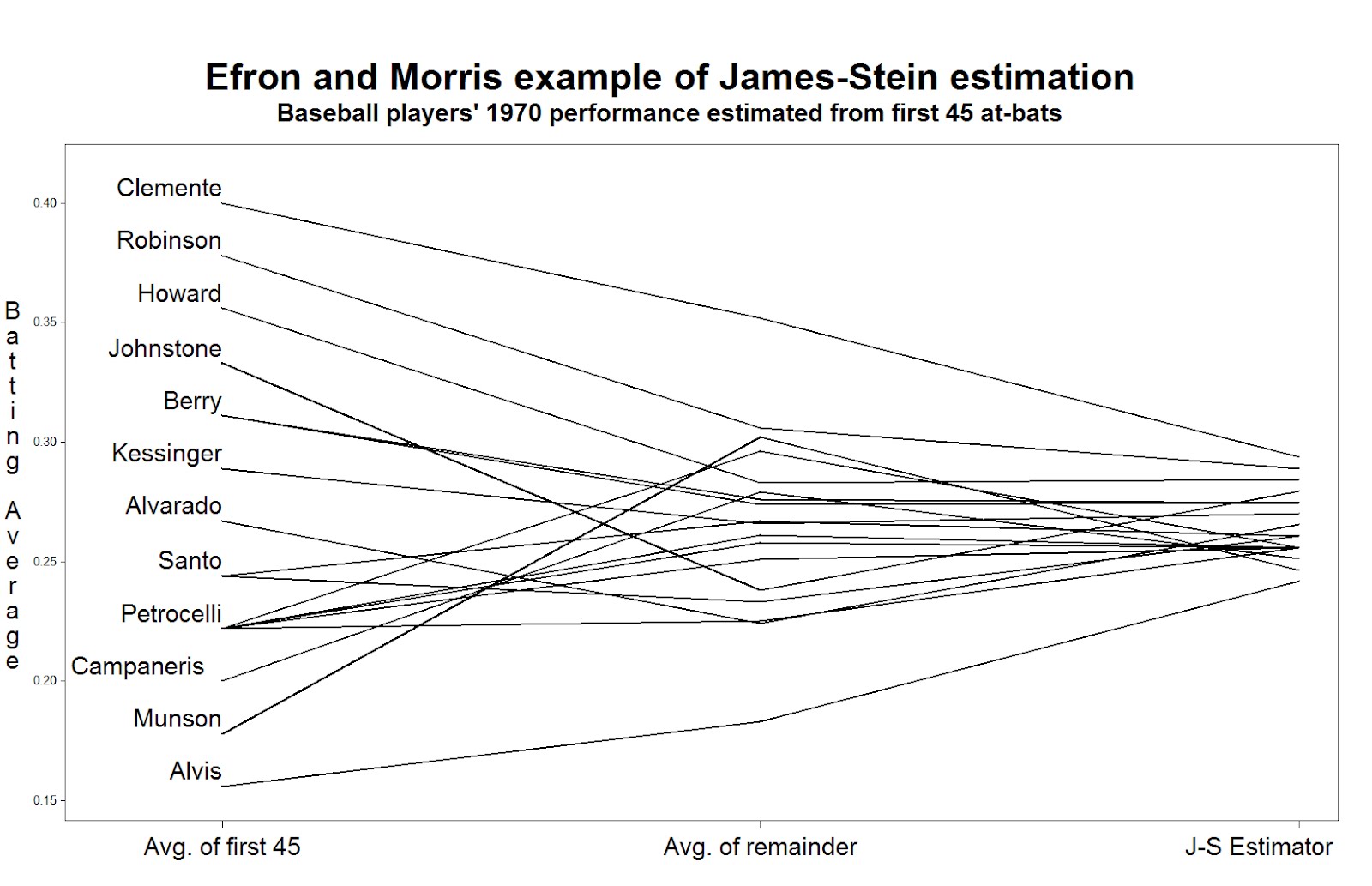
In the second data step, we calculate the James-Stein estimator according to the values reported in the paper. Then, to facilitate plotting, we convert the data to the "long" format, with three rows for each player, using the explicit output statement. The average in the first 45 at-bats, the average in the remainder of the season, and the James-Stein estimator are recorded in the same variable in each of the three rows, respectively. To distinguish between the rows, we assign a different value of time: this will be used to order the values on the graphic. We also record the last name of (most of) the players in a new variable, but only in one of the rows. This will be plotted in the graphic-- some players' names can't be shown without plotting over the data or other players' names.

Now we can generate the plot. Many features shown here have been demonstrated in several entries. We call out 1) the h option, which increases the text size in the titles and labels, 2) the offset option, which moves the data away from the edge of the plot frame, 3) the value option in the axis statement, which replaces the values of "time" with descriptive labels, and 4) the handy a*b=c syntax which replicates the plot for each player.

title h=3 "Efron and Morris example of James-Stein estimation";
title2 h=2 "Baseball players' 1970 performance estimated from first 45 at-bats";
axis1 offset = (4cm,1cm) minor=none label=none
value = (h = 2 "Avg. of first 45" "Avg. of remainder" "J-S Estimator");
axis2 order = (.150 to .400 by .050) minor=none offset=(0.5cm,1.5cm)
label = (h =2 r=90 a = 270 "Batting Average");
symbol1 i = j v = none l = 1 c = black r = 20 w=3
pointlabel = (h=2 j=l position = middle "#name");

proc gplot data = bballjs;
plot avg * time = lastname / haxis = axis1 vaxis = axis2 nolegend;
run; quit;

To read the plot (shown at the top) consider approaching the nominal true probability of a hit, as represented by the average over the remainder of the season, in the center. If you begin on the left, you see the difference associated with using the simple average of the first 45 at-bats as the estimator. Coming from the right, you see the difference associated withe using the James-Stein shrinkage estimator. The improvement associated with the James-Stein estimator is reflected in the generally shallower slopes when coming from the left. With the exception of Pirates great Roberto Clemente and declining third-baseman Max Alvis, most every line has a shallower slope from the left; James' and Stein's theoretical work proved that overall the lines must be shallower from the right.

R
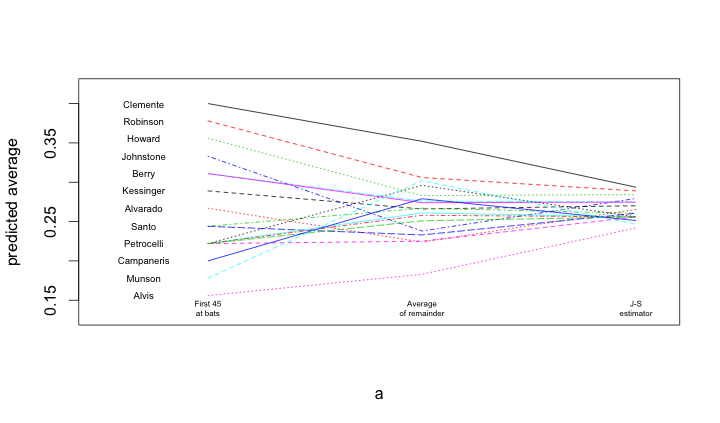
A similar process is undertaken within R. Once the data are loaded, and a subset of the names are blanked out (to improve the readability of the figure), the matplot() and matlines() functions are used to create the lines.

bball = read.table("http://www.swarthmore.edu/NatSci/peverso1/Sports%20Data/JamesSteinData/Efron-Morris%20Baseball/EfronMorrisBB.txt",
header=TRUE, stringsAsFactors=FALSE)
bball$js = bball$BattingAverage * .212 + .788 * (0.265)
bball$LastName[!is.na(match(bball$LastName,
c("Scott","Williams", "Rodriguez", "Unser","Swaboda","Spencer")))] = ""

a = matrix(rep(1:3, nrow(bball)), 3, nrow(bball))
b = matrix(c(bball$BattingAverage, bball$SeasonAverage, bball$js),
3, nrow(bball), byrow=TRUE)
matplot(a, b, pch=" ", ylab="predicted average", xaxt="n", xlim=c(0.5, 3.1), ylim=c(0.13, 0.42))
matlines(a, b)
text(rep(0.7, nrow(bball)), bball$BattingAverage, bball$LastName, cex=0.6)
text(1, 0.14, "First 45\nat bats", cex=0.5)
text(2, 0.14, "Average\nof remainder", cex=0.5)
text(3, 0.14, "J-S\nestimator", cex=0.5)
Tuesday, March 13, 2012

Example 9.23: Demonstrating proportional hazards


A colleague recently asked after a slide suitable for explaining proportional hazards. In particular, she was concerned that her audience not focus on the time to event or probability of the event. An initial thought was to display the cumulative hazards, which have a constant proportion if the model is true. But the colleague's audience might get distracted both by the language (what's a "hazard"?) and the fact that the cumulative hazard doesn't have a readily interpretable scale. The failure curve, meaning the probability of failure by time t, over time, might be a bit more accessible.

Rather than just draw some curves, we simulated data, based on the code we demonstrated previously. In this case, there's no need for any interesting censoring, but a more interesting survival curve seems worthwhile.

SAS
The more interesting curve is introduced by manually accelerating and slowing down the Weibull survival time demonstrated in the previous approach. We also trichotomized one of the exposures to match the colleague's study, and censored all values greater than 10 to keep focus where the underlying hazard was interesting.

data simcox;
beta1 = .2;
beta2 = log(1.25);
lambdat = 20; *baseline hazard;
do i = 1 to 10000;
x1 = normal(45);
x2 = (normal(0) gt -1) + (normal(0) gt 1);
linpred = -beta1*x1 - beta2*x2;
t = rand("WEIBULL", 1, lambdaT * exp(linpred));
if t gt 5 then t = 5 + (t-5)/10;
if t gt 7 then t = 7 + (t-7) * 20;
* time of event;
censored = (t > 10);
output;
end;
run;

The phreg procedure will fit the model and produces nice plots of the survival function and the cumulative hazard. But to generate useful versions of these, you need to make an additional data set with the covariate values you want to show plots for. We set the other covariate's value at 0. You can also include an id variable with some descriptive text.

data covars;
x1 = 0; x2 = 2; id = "Arm 3"; output;
x1 = 0; x2 = 1; id = "Arm 2"; output;
x1 = 0; x2 = 0; id = "Arm 1"; output;
run;

proc phreg data = simcox plot(overlay)=cumhaz;
class x2 (ref = "0");
baseline covariates = covars out= kkout cumhaz = cumhaz
survival = survival / rowid = id;
model t*censored(1) = x1 x2;
run;

The cumulative hazard plot generated by the plot option is shown below, demonstrating the correct relative hazard of 1.25. The related survival curve could be generated with plot = s .

To get the desired plot of the failure times, use the out = option to the baseline statement. This generates a data set with the listed statistics (here the cumulative hazard and the survival probability, across time). Then we can produce a plot using the gplot procedure, after generating the failure probability.

data kk2;
set kkout;
iprob = 1 - survival;
run;

goptions reset=all;
legend1 label = none value=(h=2);
axis1 order = (0 to 1 by .25) minor = none value=(h=2)
label = (a = 90 h = 3 "Probability of infection");
axis2 order = (0 to 10 by 2) minor = none value=(h=2)
label = (h=3 "Attributable time");;
symbol1 i = sm51s v = none w = 3 r = 3;
proc gplot data = kk2;
plot iprob * t = id / vaxis = axis1 haxis = axis2 legend=legend1;
run; quit;

The result is shown at the top. Note the use of the h= option in various places in the axis and legend statement to make the font more visible when shrunk to fit onto a slide. The smoothing spline plotted through the data with the smXXs interpolation makes a nice shape out of the underlying abrupt changes in the hazard. The symbol, legend, and axis statements are discussed in chapter 6.

R
As in SAS, we begin by simulating the data. Note that we use the simple categorical variable simulator mentioned in the comments for example 7.20.

n = 10000
beta1 = .2
beta2 = log(1.25)
lambdaT = 20

x1 = rnorm(n,0)
x2 = sample(0:2,n,rep=TRUE,prob=c(1/3,1/3,1/3))
# true event time
T = rweibull(n, shape=1, scale=lambdaT*exp(-beta1*x1 - beta2*x2))
T[T>5] = 5 + (T[T>5] -5)/10
T[T>7] = 7 + (T[T>7] -7) * 20
event = T < rep(10,n)

Now we can fit the model using the coxph() function from the Survival package. There is a default method for plot()ing the "survfit" objects resulting from several package functions. However, it shows the typical survival plot. To show failure probability instead, we'll manually take the complement of the survival probability, but still take advantage of the default method. Note the use of the xmax option to limit the x-axis. The results (below) are somewhat bland, and it's unclear if the lines can be colored differently, or their widths increased. They are also as angular as the cumulative hazards shown in the SAS implementation.

library(survival)
plotph = coxph(Surv(T, event)~ x1 * strata(x2),
method="breslow")
summary(plotph)
sp = survfit(plotph)
sp$surv = 1 - sp$surv
plot(sp, xmax=10)


Consequently, as is so often the case, presentation graphics require more manual fiddling. We'll begin by extracting the data we need from the "survfit" object. We'll take just the failure times and probabilities, as well as the name of the strata to which each observation belongs, limiting the data to time < 10. The last of these lines uses the names() function to pull the names of the strata, repeating each an appropriate number of times with the useful rep() function.

sp = survfit(plotph)
failtimes = sp$time[sp$time <10]
failprobs = 1 - sp$surv[sp$time <10]
failcats = c(rep(names(sp$strata),times=sp$n))[sp$time <10]

All that remains is plotting the data, which is not dissimilar to many examples in the book and in this blog. There's likely some way to make these three lines with a little less typing, but knowing how to do it from scratch gives you the most flexibility. It proved difficult to get the desired amount of smoothness from the loess(), lowess(), or supsmu() functions, but smooth.spline() served admirably. The code below demonstrates increasing the axis and tick label sizes

plot(failprobs~failtimes, type="n", ylim=c(0,1), cex.lab=2, cex.axis= 1.5,
ylab= "Probability of infection", xlab = "Attributable time")
lines(smooth.spline(y=failprobs[failcats == "x2=0"],
x=failtimes[failcats == "x2=0"],all.knots=TRUE, spar=1.8),
col = "blue", lwd = 3)
lines(smooth.spline(y=failprobs[failcats == "x2=1"],
x=failtimes[failcats == "x2=1"],all.knots=TRUE, spar=1.8),
col = "red", lwd = 3)
lines(smooth.spline(y=failprobs[failcats == "x2=2"],
x=failtimes[failcats == "x2=2"],all.knots=TRUE, spar=1.8),
col = "green", lwd = 3)
legend(x=7,y=0.4,legend=c("Arm 1", "Arm 2", "Arm 3"),
col = c("blue","red","green"), lty = c(1,1,1), lwd = c(3,3,3) )

Thursday, February 23, 2012

Example 9.21: The birthday "problem" re-examined


The so-called birthday paradox or birthday problem is simply the counter-intutitive discovery that the probability of (at least) two people in a group sharing a birthday goes up surprisingly fast as the group size increases. If the group is only 23 people, there is a 50% chance that two of them share a birthday, and with 40 people it's about 90%. There is an excellent wikipedia page discussing this.

However, this analytically derived probability is based on the assumption that births are equally likely on any day of the year. (It also ignores the occasional February 29th, and any social factors that lead people born at the same time of year to seek like spouses, and so forth.) But this assumption does not appear to be true, as laid out anecdotally and in press.

As noted in the latter link, any disparity in the probability of birth between days will improve the chances of a match. But how much? An analytic solution seems quite complex, even if we approximate the true daily distribution with a constant birth probability per month. Simulation will be simpler. While we're at it, we'll include leap days as well, since February 29th approaches.

SAS

Our approach here is based on the observation that the probability of at least one match among N people is equal to the sum of the probabilities of exactly one match in 2,...,N people. In addition, rather than simulating groups of 2, estimating the probability of a match, and repeating for groups of 3,...,N, we'll keep adding people to a group until we have a match, finding the probability of a match in all group sizes at once.

Here we use arrays (section 1.11.5) to keep track of the number of days in a month and of the people in our group. To reduce computation, we'll check for matches as we add people to the group, and only generate their birthdays if there is not yet a match. We also demonstrate the useful hyphen tool for referring to ranges of variables (1.11.4).

data bd1;
array daysmo [12] _temporary_ (31 28.25 31 30 31 30 31 31 30 31 30 31);
array dob [367] dob1 - dob367; * these variables will hold the birthdays
* the hyphen includes all the variables in the
* sequence

do group = 1 to 10000000; * simulate this many groups;
match = 0; * initialize whether there's a match in this
group, yet;
do i = 1 to 367; * loop through up to 367 subjects... the maximum
possible, obviously;
month = rantbl(0, 31*.0026123, 28*.0026785, 31*.0026838, 30*.0026426,
31*.0026702, 30*.0027424, 31*.0028655, 31*.0028954, 30*.0029407,
31*.0027705, 30*.0026842);
* choose a month of birth, by probabilities reported
in the Science News link, which are daily by month;
day = ceil((4 * daysmo[month] * uniform(0))/4);
* choose a day within the month,
note the trick used to get Leap Days;
dob[i] = mdy(month, day, 1960);
* convert month and day into a day in the year--
1960 is a convenient leap year;
do j = 1 to (i-1) until (match gt 0);
* compare each old person to the new one;
if dob[j] = dob[i] then match = i;
* if there was a match, we needed i people in the
group to make it;
end;
if match gt 0 then leave;
* no need to generate the other 367-i people;
end;
output;
end;
run;

We note here that while we allow up to 367 birthdays before a match, the probability of more than 150 is so infinitesimal that we could save the space and speed up processing time by ignoring it. Now that the groups have been simulated, we just need to summarize and present them. We tabulate how many cases of groups of size N were recorded, generate the simple analytic answer, and merge them.

proc freq data = bd1;
tables match / out=bd2 outcum; * the bd2 data set has the results;
run;

data simpreal;
set bd2;
prob = 1 - ((fact(match) * comb (365,match)) / 365**match);
realprob = cum_freq/10000000;
diff = realprob-prob;
diffpct = 100 * (diff)/prob;
run;

It's easiest to interpret the results by way of a plot. We'll plot the absolute and the relative difference on the same image with two different axes. The axis and symbol statements will make it slightly prettier, and allow us to make 0 appear at the same point on both axes.

axis1 order = (-.75 to .75 by .25) minor = none;
axis2 order = (-.00025 to .00025 by .00005) minor = none;
symbol1 v = dot h = .75 c = blue;
symbol2 font=marker v = U h = .5 c = red;

proc gplot data= simpreal (obs = 89);
plot diffpct * match / vref = 0 vaxis=axis1 legend;
plot2 diff *match/ vaxis = axis2 legend;
run; quit;

The results, shown below, are very clear-- leap day and the disequilibrium in birth month probability does increase the probability of at least one match in any group of a given size, relative to the uniform distribution across days assumed in the analytic solution. But the difference is miniscule in both the absolute and relative scale.

R
Here we mimic the approach used above, but use the apply() function family in place of some of the looping.

dayprobs = c(.0026123,.0026785,.0026838,.0026426,.0026702,.0027424,.0028655,
.0028954,.0029407,.0027705,.0026842,.0026864)
daysmo = c(31,28,31,30,31,30,31,31,30,31,30,31)
daysmo2 = c(31,28.25,31,30,31,30,31,31,30,31,30,31)
# need both: the former is how the probs are reported,
# while the latter allows leap days

moprob = daysmo * dayprobs

With the monthly probabilities established, we can sample a birth month for everyone, and then choose a birth day within month. We use the same trick as above to allow birth days of February 29th. Here we show code for 10,000 groups; with the simple cloud R this code was developed on, more caused a crash.

We've stopped referencing our book exhaustively, and doing so here would be tedious. Instead, we'll just comment that the tools we use here can be found in sections 1.4.5, 1.4.15, 1.4.16, 1.5.2, 1.8.3, 1.8.4, 1.9.1, 1.11.1, 5.2.1, 5.6.1, B.5.2, and probably others.

mob = sample(1:12,10000 * 367,rep=TRUE,prob=moprob)
dob = sapply(mob,function(x) ceiling(sample((4*daysmo2[x]),1)/4) )
# The ceiling() function isn't vectorized, so we make the equivalent
# using sapply().

mobdob = paste(mob,dob)
# concatenate the month and day to make a single variable to compare
# between people. The ISOdate() function would approximate the SAS mdy()
# function but would be much longer, and we don't need it.

# convert the vector into a matrix with the maximum
# group size as the number of columns
# as noted above, this could safely be truncated, with great savings
mdmat = matrix(mobdob, ncol=367, nrow=10000)

To find duplicate birthdays in each row of the matrix, we'll write a function to compare the number of unique values with the length of the vector, then call it repeatedly in a for() loop until there is a difference. Then, to save (a lot) of computations, we'll break out of the loop and report the number needed to make the match. Finally, we'll call this vector-based function using apply() to perform it on each row of the birthday matrix.

matchn = function(x) {
for (i in 1:367){
if (length(unique(x[1:i])) != i) break
}
return(i)
}

groups = apply(mdmat, 1, matchn)

bdprobs = cumsum(table(groups)/10000)
# find the N with each group number, divide by number of groups
# and get the cumulative sum

rgroups = as.numeric(names(bdprobs))
# extract the group sizes from the table
probs = 1 - ((factorial(rgroups) * choose(365,rgroups)) / 365**rgroups)
# calculate the analytic answer, for any group size
# for which there was an observed simulated value

diffs = bdprobs - probs
diffpcts = diffs/probs

To plot the differences and percent differences in probabilities, we modify (slightly) the functions for a multiple-axis scatterplot we show in our book in section 5.6.1. You can find the code for this and all the book examples on the book web site.

addsecondy <- function(x, y, origy, yname="Y2") {
prevlimits <- range(origy)
axislimits <- range(y)
axis(side=4, at=prevlimits[1] + diff(prevlimits)*c(0:5)/5,
labels=round(axislimits[1] + diff(axislimits)*c(0:5)/5, 3))
mtext(yname, side=4)
newy <- (y-axislimits[1])/(diff(axislimits)/diff(prevlimits)) +
prevlimits[1]
points(x, newy, pch=2)
abline(h=(-axislimits[1])/(diff(axislimits)/diff(prevlimits)) +
prevlimits[1])
}

plottwoy <- function(x, y1, y2, xname="X", y1name="Y1", y2name="Y2")
{
plot(x, y1, ylab=y1name, xlab=xname)
abline(h=0)
addsecondy(x, y2, y1, yname=y2name)
}

plottwoy(rgroups, diffs, diffpcts, xname="Number in group",
y1name="Diff in prob", y2name="Diff in percent")
legend(80, .0013, pch=1:2, legend=c("Diffs", "Pcts"))

The resulting plot, (which is based on 100,000 groups, tolerable compute time on a laptop) is shown at the top. Aligning the 0 on each axis was more of a hassle than seemed worth it for today. However, the message is equally clear-- a clearly larger probability with the observed birth distribution, but not a meaningful difference.

Tuesday, October 25, 2011

Example 9.11: Employment plot


A facebook friend posted the picture reproduced above-- it makes the case that President Obama has been a successful creator of jobs, and also paints GW Bush as a president who lost jobs. Another friend pointed out that to be fair, all of Bush's presidency ought to be included. Let's make a fair plot of job growth and loss. Data can be retrieved from the Bureau of Labor Statistics, where Nick will be spending his next sabbatical. The extract we use below is also available from the book website. This particular table reports the cumulative change over the past three months, adjusting for seasonal trends. This tends to smooth out the line.

SAS

The first job is to get the data into SAS. Here we demonstrate reading it directly from a URL, as outlined in section 1.1.6.

filename myurl
url "http://www.math.smith.edu/sasr/datasets/bls.csv";

data q_change;
infile myurl delimiter=',';
input Year Jan Feb Mar Apr May Jun Jul Aug Sep Oct Nov Dec Annual;
run;

The raw data are in a pretty inconvenient format for plotting. To make a long, narrow data set with a row for each month, we'll use proc transpose (section 1.5.3) to flip each year on its side. Then, to attach a date to each measure, we'll use the compress function. First we add "01" (the first of the month) to the month name, which is in a variable created by proc transpose with the default name "_name_". Then we tack on the year variable, and input the string in the date format. The resulting variable is a SAS date (number of days since 12/31/1959, see section 1.6.1).

proc transpose data=q_change out=q2;
by year;
run;

data q3;
set q2;
date1 = input(compress("01"||_name_||year),date11.);
run;

Now the data are ready to plot. It would probably be possible to use proc sgplot but proc gplot is more flexible and allows better control for presentation graphics.

title "3-month change in private-sector jobs, seasonally adjusted";
axis1 minor = none label = (h=2 angle = 90 "Thousands of jobs")
value = (h = 2);
axis2 minor = none value = (h=2)label = none
offset = (1cm, -5cm)
reflabel = (h=1.5 "Truman" "Eisenhower" "Kennedy/Johnson"
"Nixon/Ford" "Carter" "Reagan" "GHW Bush" "Clinton" "GW Bush" "Obama" );
symbol1 i=j v=none w=3;

proc gplot data=q3;
plot col1 * date1 / vaxis=axis1 haxis=axis2 vref=0
href = '12apr1945'd '21jan1953'd '20jan1961'd '20jan1969'd
'20jan1977'd '21jan1981'd '20jan1989'd '20jan1993'd
'20jan2001'd '20jan2009'd;
format date1 monyy6.;
run;
quit;

Much of the syntax above has been demonstrated in our book examples and blog entries. What may be unfamiliar is the use of the href option in the plot statement and the reflabel option in the axis statement. The former draws reference lines at the listed values in the plot, while the latter adds titles to these lines. The resulting plot is shown here.

Looking fairly across postwar presidencies, only the Kennedy/Johnson and Clinton years were mostly unmarred by periods with large losses in jobs. The Carter years were also times jobs were consistently added. While the graphic shared on facebook overstates the case against GW Bush, it fairly shows Obama as a job creator thus far, to the extent a president can be credited with jobs created on his watch.


R

The main trick in R is loading the data and getting it into the correct format.
here we use cbind() to grab the appropriate columns, then transpose that matrix and turn it into a vector which serves as input for making a time series object with the ts() command (as in section 4.2.8). Once this is created, the default plot for a time series object is close to what we have in mind.

ds = read.csv("http://www.math.smith.edu/sasr/datasets/bls.csv",
header=FALSE)
jobs = with(ds, cbind(V2, V3, V4, V5, V6, V7, V8, V9, V10,
V11, V12, V13))
jobsts = ts(as.vector(t(jobs)), start=c(1945, 1),
frequency=12)
plot(jobsts, plot.type="single", col=4,
ylab="number of jobs (in thousands)")

All that remains is to add the reference lines for 0 jobs and the presidencies. The lines are most easily added with the abline() function (section 5.2.1). Easier than adding labels for the lines within the plot function will be to use the mtext() function to place the labels in the margins. We'll write a little function to save a few keystrokes by plotting the line and adding the label together.

abline(h=0)
presline = function(date,line,name){
mtext(at=date,text= name, line=line)
abline(v = date)
}
presline(1946,1,"Truman")
presline(1953,2,"Eisenhower")
presline(1961,1,"Kennedy/Johnson")
presline(1969,2,"Nixon/Ford")
presline(1977,1,"Carter")
presline(1981,2,"Reagan")
presline(1989,1,"GHW Bush")
presline(1993,2,"Clinton")
presline(2001,1,"GW Bush")
presline(2009,2,"Obama")

It might be worthwhile to standardize the number of jobs to the population size, since the dramatic loss of jobs due to demobilization after the Second World War during a single month in 1945 (2.4 million) represented 1.7% of the population, while the recent loss of 2.3 million jobs in 2009 represented only 0.8% of the population.