Showing posts with label SAS macro. Show all posts

Wednesday, January 22, 2014

Example 2014.2: Block randomization

This week I had to block-randomize some units. This is ordinarily the sort of thing I would do in SAS, just because it would be faster for me. But I had already started work on the project R, using knitr/LaTeX to make a PDF, so it made sense to continue the work in R.

R
As is my standard practice now in both languages, I set thing up to make it easy to create a function later. I do this by creating variables with the ingredients to begin with, then call them as variables, rather than as values, in my code. In the example, I assume 40 assignments are required, with a block size of 6.
I generate the blocks themselves with the rep() function, calculating the number of blocks needed to ensure at least N items will be generated. Then I make a data frame with the block numbers and a random variate, as well as the original order of the envelopes. The only possibly confusing part of the sequence is the use of the order() function. What it returns is a vector of integer values with the row numbers of the original data set sorted by the listed variables. So the expression a1[order(a1$block,a1$rand),] translates to "from the a1 data frame, give me the rows ordered by sorting the rand variable within the block variable, and all columns." I assign the arms in a systematic way to the randomly ordered units, then resort them back into their original order.
seed=42
blocksize = 6
N = 40
set.seed(seed)
block = rep(1:ceiling(N/blocksize), each = blocksize)
a1 = data.frame(block, rand=runif(length(block)), envelope= 1: length(block))
a2 = a1[order(a1$block,a1$rand),]
a2$arm = rep(c("Arm 1", "Arm 2"),times = length(block)/2)
assign = a2[order(a2$envelope),]
> head(assign,12)
   block       rand envelope   arm
1      1 0.76450776        1 Arm 1
2      1 0.62361346        2 Arm 2
3      1 0.14844661        3 Arm 2
4      1 0.08026447        4 Arm 1
5      1 0.46406955        5 Arm 1
6      1 0.77936816        6 Arm 2
7      2 0.73352796        7 Arm 2
8      2 0.81723044        8 Arm 1
9      2 0.17016248        9 Arm 2
10     2 0.94472033       10 Arm 2
11     2 0.29362384       11 Arm 1
12     2 0.14907205       12 Arm 1
It's trivial to convert this to a function-- all I have to do is omit the lines where I assign values to the seed, sample size, and block size, and make the same names into parameters of the function.
blockrand = function(seed,blocksize,N){
  set.seed(seed)
  block = rep(1:ceiling(N/blocksize), each = blocksize)
  a1 = data.frame(block, rand=runif(length(block)), envelope= 1: length(block))
  a2 = a1[order(a1$block,a1$rand),]
  a2$arm = rep(c("Arm 1", "Arm 2"),times = length(block)/2)
  assign = a2[order(a2$envelope),]
  return(assign)
}


SAS
This job is also pretty simple in SAS. I use the do loop, twice, to produce the blocks and items (or units) within block, sssign the arm systematically, and generate the random variate which will provide the sort order within block. Then sort on the random order within block, and use the "Obs" (observation number) that's printed with the data as the envelope number.
%let N = 40;
%let blocksize = 6;
%let seed = 42;
data blocks;
call streaminit(&seed);
do block = 1 to ceil(&N/&blocksize);
  do item = 1 to &blocksize;
     if item le &blocksize/2 then arm="Arm 1";
    else arm="Arm 2";
     rand = rand('UNIFORM');
  output;
  end;
end;
run;

proc sort data = blocks; by block rand; run;

proc print data = blocks (obs = 12) obs="Envelope"; run;
Envelope    block    item     arm       rand

    1         1        3     Arm 1    0.13661
    2         1        1     Arm 1    0.51339
    3         1        5     Arm 2    0.72828
    4         1        2     Arm 1    0.74696
    5         1        4     Arm 2    0.75284
    6         1        6     Arm 2    0.90095
    7         2        2     Arm 1    0.04539
    8         2        6     Arm 2    0.15949
    9         2        4     Arm 2    0.21871
   10         2        1     Arm 1    0.66036
   11         2        5     Arm 2    0.85673
   12         2        3     Arm 1    0.98189
It's also fairly trivial to make this into a macro in SAS.
%macro blockrand(N, blocksize, seed); 
data blocks;
call streaminit(&seed);
do block = 1 to ceil(&N/&blocksize);
  do item = 1 to &blocksize;
     if item le &blocksize/2 then arm="Arm 1";
    else arm="Arm 2";
     rand = rand('UNIFORM');
  output;
  end;
end;
run;

proc sort data = blocks; by block rand; run;
%mend blockrand;


An unrelated note about aggregators: We love aggregators! Aggregators collect blogs that have similar coverage for the convenience of readers, and for blog authors they offer a way to reach new audiences. SAS and R is aggregated by R-bloggers, PROC-X, and statsblogs with our permission, and by at least 2 other aggregating services which have never contacted us. If you read this on an aggregator that does not credit the blogs it incorporates, please come visit us at SAS and R. We answer comments there and offer direct subscriptions if you like our content. In addition, no one is allowed to profit by this work under our license; if you see advertisements on this page, the aggregator is violating the terms by which we publish our work.

Monday, June 18, 2012

Example 9.35: Discrete randomization and formatted output

A colleague asked for help with randomly choosing a kid within a family. This is for a trial in which families are recruited at well-child visits, but in each family only one of the children having a well-child visit that day can be in the study. The idea is that after recruiting the family, the research assistant needs to choose one child, but if they make that choice themselves, the children are unlikely to be representative. Instead, we'll allow them to make a random decision through an easily used slip that can be put into sealed envelopes. The envisioned process is that the RA will recruit the family, determine the number of eligible children, then open the envelope to find out which child was randomly selected.

One thought here would be to generate separate stacks of envelopes for each given family size, and have the research assistant open an envelope from the appropriate stack. However, this could be logistically challenging, especially since the RAs will spend weeks away from the home office. Instead, we'll include all plausible family sizes on each slip of paper. It seems unlikely that more than 5 children in a family will have well-child visits on the same day.

SAS
We'll use the SAS example to demonstrate using SAS macros to write SAS code, as well as showing a plausible use for SAS formats (section 1.4.12) and making use of proc print.

/* the following macro will write out equal probabilities for selecting
each integer between 1 and the argument, in the format needed for the
rand function. E.g., if the argument is 3,
it will write out
1/3,1/3,1/3
*/

%macro tbls(n);
%do i = 1 %to &n;
1/&n %if &i < &n %then ,
%end;
%mend tbls;

/* then we can use the %tbls macro to create the randomization
via rand("TABLE") (section 1.10.4). */
data kids;
do family = 1 to 10000;
nkids = 2; chosen = rand("TABLE",%tbls(2)); output;
nkids = 3; chosen = rand("TABLE",%tbls(3)); output;
nkids = 4; chosen = rand("TABLE",%tbls(4)); output;
nkids = 5; chosen = rand("TABLE",%tbls(5)); output;
end;
run;

/* check randomization */
proc freq data = kids;
table nkids * chosen / nocol nopercent;
run;

nkids chosen

Frequency|
Row Pct | 1| 2| 3| 4| 5| Total
---------+--------+--------+--------+--------+--------+
2 | 50256 | 49744 | 0 | 0 | 0 | 100000
| 50.26 | 49.74 | 0.00 | 0.00 | 0.00 |
---------+--------+--------+--------+--------+--------+
3 | 33429 | 33292 | 33279 | 0 | 0 | 100000
| 33.43 | 33.29 | 33.28 | 0.00 | 0.00 |
---------+--------+--------+--------+--------+--------+
4 | 25039 | 24839 | 25245 | 24877 | 0 | 100000
| 25.04 | 24.84 | 25.25 | 24.88 | 0.00 |
---------+--------+--------+--------+--------+--------+
5 | 19930 | 20074 | 20188 | 20036 | 19772 | 100000
| 19.93 | 20.07 | 20.19 | 20.04 | 19.77 |
---------+--------+--------+--------+--------+--------+
Total 128654 127949 78712 44913 19772 400000

Looks pretty good. Now we need to make the output usable to the research assistants, by formatting the results into English. We'll use the same format for each number of kids. This saves some keystrokes now, but may possibly cause the RAs some confusion-- it means that we might refer to the "4th oldest" of 4 children, rather than the "youngest". We could fix this using a different format for each number of children, analogous to the R version below.

proc format;
value chosen
1 = "oldest"
2 = '2nd oldest'
3 = '3rd oldest'
4 = '4th oldest'
5 = '5th oldest';
run;

/* now, make a text variable the concatenates (section 1.4.5) the variables
and some explanatory text */
data k2;
set kids;
if nkids eq 2 then
t1 = "If there are " || strip(nkids) ||" children then choose the " ||
strip(put(chosen,chosen.)) || " child.";
else
t1 = " " || strip(nkids) ||" ________________________ " ||
strip(put(chosen,chosen.));
run;

/* then we print. Notice the options to print in plain text, shorten the
page length and width, and remove the date and page number from the SAS output, as
well as in the proc print statement to remove the observation number and
show the line number, with a few other tricks */
options nonumber nodate ps = 60 ls = 68;
OPTIONS FORMCHAR="|----|+|---+=|-/\<>*";
proc print data = k2 (obs = 3) noobs label sumlabel;
by family;
var t1;
label t1 = '00'x family = "Envelope";
run;

---------------------------- Envelope=1 ----------------------------


If there are 2 children then choose the 2nd oldest child.
3 ________________________ 3rd oldest
4 ________________________ 4th oldest
5 ________________________ 5th oldest


---------------------------- Envelope=2 ----------------------------


If there are 2 children then choose the 2nd oldest child.
3 ________________________ oldest
4 ________________________ oldest
5 ________________________ 3rd oldest


---------------------------- Envelope=3 ----------------------------


If there are 2 children then choose the 2nd oldest child.
3 ________________________ 2nd oldest
4 ________________________ 3rd oldest
5 ________________________ 2nd oldest


R
For R, we leave some trial code in place, to demonstrate how one might discover, test, and build R code in this setting. Most results have been omitted.

sample(5, size = 1)
# choose a (discrete uniform) random integer between 1 and 5

apply(matrix(2:5),1,sample,size=1)
# choose a random integer between 1 and 2, then between 1 and 3, etc.,
# using apply() to repeat the call to sample() with different maximum number
# apply() needs a matrix or array input
# result of this is the raw data needed for one family

replicate(3,apply(matrix(2:5),1,sample,size=1))
# replicate() is in the apply() family and just repeats the
# function n times

[,1] [,2] [,3]
[1,] 2 1 2
[2,] 2 1 2
[3,] 2 2 2
[4,] 3 5 4

Now we have the raw data for the envelopes. Before formatting it for printing, let's check it to make sure it works correctly.

test=replicate(100000, apply(matrix(2:5), 1, sample, size=1))
apply(test, 1, summary)
[,1] [,2] [,3] [,4]
Min. 1.0 1 1.000 1.000
1st Qu. 1.0 1 1.000 2.000
Median 1.0 2 2.000 3.000
Mean 1.5 2 2.492 3.003
3rd Qu. 2.0 3 3.000 4.000
Max. 2.0 3 4.000 5.000
# this is not so helpful-- need the count or percent for each number
# this would be the default if the data were factors, but they aren't
# check to see if we can trick summary() into treating these integers
# as if they were factors
methods(summary)
# yes, there's a summary() method for factors-- let's apply it
# there's also apply(test,1,table) which might be better, if you remember it
apply(test, 1, summary.factor)
[[1]]
1 2
50025 49975

[[2]]
1 2 3
33329 33366 33305

[[3]]
1 2 3 4
25231 25134 24849 24786

[[4]]
1 2 3 4 5
19836 20068 20065 20022 20009
# apply(test,1,table) will give similar results, if you remember it

Well, that's not too pretty, but it's clear that the randomization is working. Now it's time to work on formatting the output.

mylist=replicate(5, apply(matrix(2:5), 1, sample, size=1))
# brief example data set

# We'll need to use some formatted values (section 1.14.12), as in SAS.
# Here, we'll make new value labels for each number of children,
# which will make the output easier to read. We add in an envelope
# number and wrap it all into a data frame.
df = data.frame(envelope = 1:5,
twokids=factor(mylist[1,],1:2,labels=c("youngest","oldest")),
threekids=factor(mylist[2,],1:3,labels=c("youngest", "middle", "oldest")),
fourkids=factor(mylist[3,],1:4,labels=c("youngest", "second youngest",
"second oldest", "oldest")),
fivekids=factor(mylist[4,],1:5,labels=c("youngest", "second youngest",
"middle", "second oldest", "oldest"))
)

# now we need a function to take a row of the data frame and make a single slip
# the paste() function (section 1.4.5) puts together the fixed and variable
# content of each row, while the cat() function will print it without quotes
slip = function(kidvec) {
cat(paste("------------- Envelope", kidvec[1], "------------------"))
cat(paste("\nIf there are", 2:5, " children, select the", kidvec[2:5],"child"))
cat("\n \n \n")
}

# test it on one row
slip(df[1,])

# looks good-- now we can apply() it to each row of the data frame
apply(df, 1, slip)

------------- Envelope 1 ------------------
If there are 2 children, select the youngest child
If there are 3 children, select the youngest child
If there are 4 children, select the second youngest child
If there are 5 children, select the youngest child


------------- Envelope 2 ------------------
If there are 2 children, select the youngest child
If there are 3 children, select the youngest child
If there are 4 children, select the second oldest child
If there are 5 children, select the middle child


------------- Envelope 3 ------------------
If there are 2 children, select the youngest child
If there are 3 children, select the youngest child
If there are 4 children, select the youngest child
If there are 5 children, select the second youngest child

# and so forth

# finally, we can save the result in a file with
# capture.output()
capture.output(apply(df,1,slip), file="testslip.txt")


An unrelated note about aggregators:
We love aggregators! Aggregators collect blogs that have similar coverage for the convenience of readers, and for blog authors they offer a way to reach new audiences. SAS and R is aggregated by R-bloggers, PROC-X, and statsblogs with our permission, and by at least 2 other aggregating services which have never contacted us. If you read this on an aggregator that does not credit the blogs it incorporates, please come visit us at SAS and R. We answer comments there and offer direct subscriptions if you like our content. In addition, no one is allowed to profit by this work under our license; if you see advertisements on this page, the aggregator is violating the terms by which we publish our work.
Tuesday, June 5, 2012

Example 9.34: Bland-Altman type plot


The Bland-Altman plot is a visual aid for assessing differences between two ways of measuring something. For example, one might compare two scales this way, or two devices for measuring particulate matter.

The plot simply displays the difference between the measures against their average. Rather than a statistical test, it is intended to demonstrate both typical differences between the measures and any patterns such differences may take. The utility of the plot, as compared with linear regression or sample correlation is that the plot is not affected by the range, while the sample correlation will typically increase with the range. In contrast, linear regression shows the strength of the linear association but not how closely the two measures agree. The Bland-Altman plot allows the user to focus on differences between the measures, perhaps focusing on the clinical relevance of these differences.

A peer reviewer recently asked a colleague to consider a Bland-Altman plot for two methods of assessing fatness: the familiar BMI (kg/m^2) and the actual fat mass measured by a sophisticated DXA machine. These are obviously not measures of the same thing, so a Bland-Altman plot is not exactly appropriate. But since the BMI is so simple to calculate and the DXA machine is so expensive, it would be nice if the BMI could be substituted for DXA fat mass.

For this purpose, we'll generate a modified Bland-Altman plot in which each measure is first standardized to have mean 0 and standard deviation 1. The resulting plot should be assessed for pattern as usual, but typical differences must be considered on the standardized scale-- that is, differences of a unit should be considered large, and good agreement might require typical differences of 0.2 or less.

SAS
Since this is a job we might want to repeat, we'll build a SAS macro to do it. This will also demonstrate some useful features. The macro accepts a data set name and the names of two variables as input. We'll comment on interesting features in code comments. If you're an R coder, note that SAS macro variables are merely text, not objects. We have to manually assign "values" (i.e., numbers represented as text strings) to newly created macro variables.

%macro baplot(datain=,x=x,y=y);

/* proc standard standardizes the variables and saves the results in the
same variable names in the output data set. This means we can continue
using the input variable names throughout. */
proc standard data = &datain out=ba_std mean=0 std=1;
var &x &y;
run;

/* calculate differences and averages */
data ba;
set ba_std;
bamean = (&x + &y)/2;;
badiff = &y-&x;
run;

ods output summary=basumm;
ods select none;
proc means data = ba mean std;
var badiff;
run;
ods select all;

/* In the following, we take values calculated from a data set for the
confidence limits and store them in macro variables. That's the
only way to use them later in code.
The syntax is: call symput('varname', value);
Note that 'bias' is purely nominal, as the standardization means that
the mean difference is 0. */
data lines;
set basumm;
call symput('bias',badiff_mean);
call symput('hici',badiff_mean+(1.96 * badiff_stddev));
call symput('loci',badiff_mean-(1.96 * badiff_stddev));
run;

/* We use the macro variables just created in the vref= option below;
vref draws reference line(s) on the vertical axis. lvref specifies
a line type. */
symbol1 i = none v = dot h = .5;
title "Bland-Altman type plot of &x and &y";
title2 "&x and &y standardized";
proc gplot data=ba;
plot badiff * bamean / vref = &bias &hici &loci lvref=3;
label badiff = "difference" bamean="mean";
run;
%mend baplot;

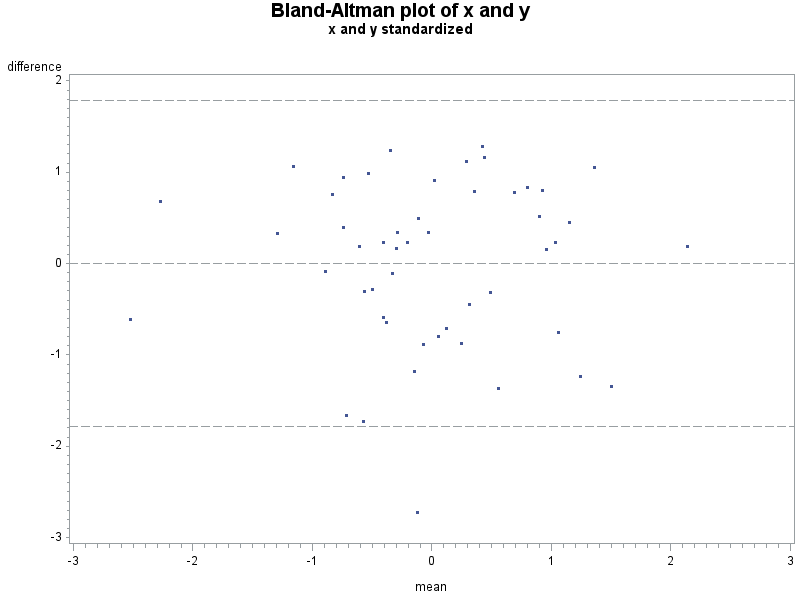
Here is a fake sample data set, with the plot resulting from the macro shown above. An analysis would suggest that despite the correlation of 0.59 and p-value for the linear association < .0001, that these two measures don't agree too well.

data fake;
do i = 1 to 50;
/* the "42" in the code below sets the seed for the pseudo-RNG
for this and later calls. See section 1.10.9. */
x = normal(42);
y = x + normal(0);
output;
end;
run;

%baplot(datain=fake, x=x, y=y);


R
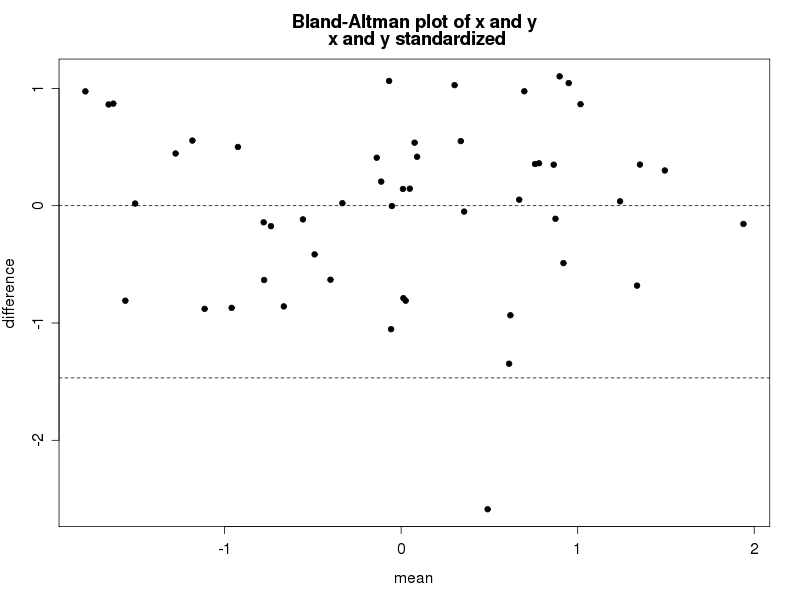
Paralleling SAS, we'll write a small function to draw the plot, annotating within to highlight some details. If you're primarily a SAS coder, note the syntax needed to find the name of an object submitted to a function. In contrast, assigning values to new objects created with the function is entirely natural. The resulting plot is shown below.

# set seed, for replicability
set.seed(42)
x = rnorm(50)
y = x + rnorm(50)

baplot = function(x,y){
xstd = (x - mean(x))/sd(x)
ystd = (y - mean(y))/sd(y)

bamean = (xstd+ystd)/2
badiff = (ystd-xstd)

plot(badiff~bamean, pch=20, xlab="mean", ylab="difference")
# in the following, the deparse(substitute(varname)) is what retrieves the
# name of the argument as data
title(main=paste("Bland-Altman plot of x and y\n",
deparse(substitute(x)), "and", deparse(substitute(y)),
"standardized"), adj=".5")
#construct the reference lines on the fly: no need to save the values in new
# variable names
abline(h = c(mean(badiff), mean(badiff)+1.96 * sd(badiff),
mean(badiff)-1.96 * sd(badiff)), lty=2)
}

baplot(x,y)


An unrelated note about aggregators:We love aggregators! Aggregators collect blogs that have similar coverage for the convenience of readers, and for blog authors they offer a way to reach new audiences. SAS and R is aggregated by R-bloggers, PROC-X, and statsblogs with our permission, and by at least 2 other aggregating services which have never contacted us. If you read this on an aggregator that does not credit the blogs it incorporates, please come visit us at SAS and R. We answer comments there and offer direct subscriptions if you like our content. In addition, no one is allowed to profit by this work under our license; if you see advertisements on this page, the aggregator is violating the terms by which we publish our work.
Monday, May 21, 2012

Example 9.32: Multiple testing simulation

In examples 9.30 and 9.31 we explored corrections for multiple testing and then extracting p-values adjusted by the Benjamini and Hochberg (or FDR) procedure. In this post we'll develop a simulation to explore the impact of "strong" and "weak" control of the family-wise error rate offered in multiple comparison corrections. Loosely put, weak control procedures may fail when some of the null hypotheses are actually false, in that the remaining (true) nulls may be rejected more than the nominal proportion of times.

For our simulation, we'll develop flexible code to generate some p-values from false nulls and others from true nulls. We'll assume that the true nulls have p-values distributed uniform (0,1); the false nulls will have p-values distributed uniform with a user-determined maximum. We'll also allow the number of tests overall and the number of false nulls to be set.

SAS
In SAS, a macro does the job. It accepts the user parameters described above, then generates false and true nulls for each desired simulation. With the data created, we can use proc multtest to apply the FDR procedure, with the ODS system saving the results. Note how the by statement allows us to replicate the analysis for each simulated set of p-values without creating a separate data set for each one. (Also note that we do not use proc sort before that by statement-- this can be risky, but works fine here.)

%macro fdr(nsims=1, ntests = 20, nfalse=10, howfalse=.01);
ods select none;
data test;
do sim = 1 to &nsims;
do i = 1 to &ntests;
raw_p = uniform(0) *
( ((i le &nfalse) * &howfalse ) + ((i gt &nfalse) * 1 ) );
output;
end;
end;
run;

ods output pvalues = __pv;
proc multtest inpvalues=test fdr;
by sim;
run;

With the results in hand, (still within the macro) we need to do some massaging to make the results usable. First we'll recode the rejections (assuming a 0.05 alpha level) so that non-rejections are 0 and rejections are 1/number of tests. That way we can just sum across the results to get the proportion of rejections. Next, we transform the data to get each simulation in a row (section 1.5.4). (The data output from proc multtest has nsims*ntests rows. After transposing, there are nsims rows.) Finally, we can sum across the rows to get the proportion of tests rejected in each simulated family of tests. The results are shown in a table made with proc freq.

data __pv1;
set __pv;
if falsediscoveryrate lt 0.05 then fdrprop = 1/&ntests;
else fdrprop =0;
run;

proc transpose data = __pv1 (keep =sim fdrprop) out = pvals_a;
by sim; run;

data pvals;
set pvals_a;
prop = sum(of col1 - col&ntests);
run;
ods select all;

proc freq data = pvals; tables prop; run;
%mend fdr;

%fdr(nsims = 1000, ntests = 20, nfalse = 10, howfalse=.001);

Cumulative Cumulative
prop Frequency Percent Frequency Percent
---------------------------------------------------------
0.5 758 75.80 758 75.80
0.55 210 21.00 968 96.80
0.6 27 2.70 995 99.50
0.65 5 0.50 1000 100.00

So true nulls were rejected 24% of the time, which seems like a lot. Multiple comparison procedures with "strong" control of the familywise error rate will reject them only 5% of the time. Building this simulation as a macro facilitates exploring the effects of the multiple comparison procedures in a variety of settings.

R
As in example 9.31, the R code is rather simpler, though perhaps a bit opaque. To make the p-values, we make them first for all of tests with the false, then for all of the tests with the true nulls. The matrix function reads these in by column, by default, meaning that the first nfalse columns get the nsims*nfalse observations. The apply function generates the FDR p-values for each row of the data set. The t() function just transposes the resulting matrix so that we get back a row for each simulation. As in the SAS version, we'll count each rejection as 1/ntests, and non-rejections as 0; we do this with the ifelse() statement. Then we sum across the simulations with another call to apply() and show the results with a simple table.

checkfdr = function(nsims=1, ntests=100, nfalse=0, howfalse=0.001) {
raw_p = matrix(c(runif(nfalse * nsims) * howfalse,
runif((ntests-nfalse) * nsims)), nrow=nsims)
fdr = t(apply(raw_p, 1, p.adjust, "fdr"))
reject = ifelse(fdr<.05, 1/ntests,0)
prop = apply(reject, 1, sum)
prop.table(table(prop))
}

> checkfdr(nsims=1000, ntests=20, nfalse=10, howfalse=.001)
prop
0.5 0.55 0.6 0.65
0.755 0.210 0.032 0.003

The results are reassuringly similar to those from SAS. In this R code, it's particularly simple to try a different test-- just replace "fdr" in the p.adjust() call. Here's the result with the Hochberg test, which has strong control.

checkhoch = function(nsims=1, ntests=100, nfalse=0, howfalse=0.001) {
pvals = matrix(c(runif(nfalse * nsims) * howfalse,
runif((ntests-nfalse) * nsims)), nrow=nsims)
hochberg = t(apply(pvals, 1, p.adjust,"hochberg"))
reject = ifelse(hochberg<.05,1/ntests,0)
prop = apply(reject, 1, sum)
prop.table(table(prop))
}

> checkhoch(nsims=1000, ntests=20, nfalse=10, howfalse=.001)
prop
0.5 0.55 0.6
0.951 0.046 0.003

With this procedure one or more of the true nulls is rejected an appropriate 4.9% of the time. For the most part, we feel more comfortable using multiple testing procedures with "strong control".


An unrelated note about aggregators
We love aggregators! Aggregators collect blogs that have similar coverage for the convenience of readers, and for blog authors they offer a way to reach new audiences. SAS and R is aggregated by R-bloggers, PROC-X, and statsblogs with our permission, and by at least 2 other aggregating services which have never contacted us. If you read this on an aggregator that does not credit the blogs it incorporates, please come visit us at SAS and R. We answer comments there and offer direct subscriptions if you like our content. In addition, no one is allowed to profit by this work under our license; if you see advertisements on this page, the aggregator is violating the terms by which we publish our work.

Tuesday, November 29, 2011

Example 9.16: Small multiples


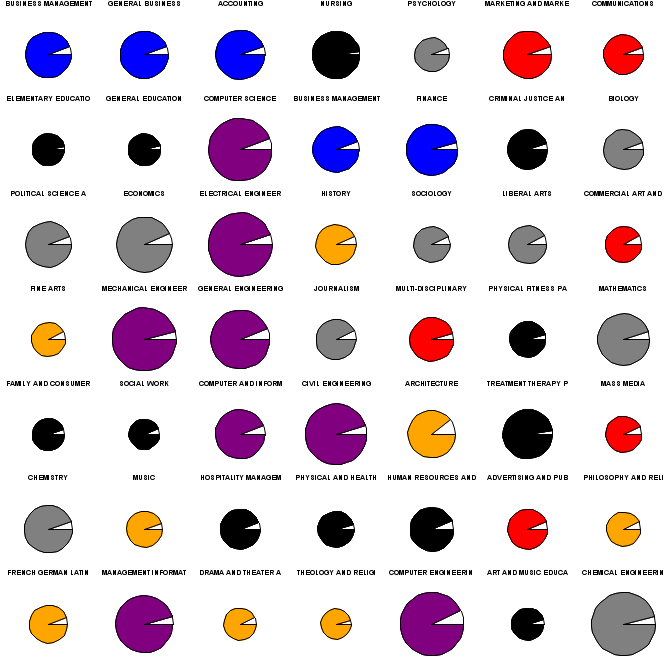
Small multiples are one of the great ideas of graphics visionary Edward Tufte (e.g., in Envisioning Information). Briefly, the idea is that if many variations on a theme are presented, differences quickly become apparent. Today we offer general guidance on creating figures with small multiples.

As an example, we'll show graphics for the popularity, salary, and unemployment rates for college majors. This data was discussed here where a scatterplot graphic was presented. We draw on data and code presented there as well. The scatterplot does not show the unemployment rate, and the width of the field names and arbitrarily sized text makes it difficult to determine the popularity ranking. In contrast, the small multiples plot, demonstrated above, makes each of these features easy to see. (Click on the picture for a clearer image.)

R

The graphics options in R, particularly par("mfrow") or par("mfcol"), are well-suited to small multiples. The main tip here is to minimize the space reserved for margins and titles. In the example below, we do this with the mar, mgp, and oma settings. We'll begin by setting up the data in a process that relies heavily on the code here. (Note that the zip file referred to includes data already in the R format-- since our point today is not data management, we don't replicate the process used to make this out of the raw data.)

clean = function(x) as.numeric(gsub("\\$|, ", "", x))
clean2 = function(x) as.numeric(gsub("%", "", x))
load("table.rda")
X[,2] = clean2(X[,2])
for (i in 3:5) X[,i] = clean(X[,i])


X$cols = NA
X$cols[grep("BUSI|ACC|FINAN",X[,1])] = 1
X$cols[grep("ENGINEERING",X[,1])] = 2
X$cols[grep("STAT|COMPU",X[,1])] = 3
X$cols[grep("BIOL|CHEMI|PHYSICS|MATHEM",X[,1])] = 4
X$cols[grep("ENGLISH|HISTORY|LANG|FINE|MUSIC|PHILOS|DRAMA|LIBERAL|ARCH|THEO",X[,1])] = 5
X$cols[grep("SOCIO|PSYCH|POLI|ECONO|JOURNAL",X[,1])] = 6
X$cols[grep("COMMUN|MARKET|COMMER|MULTI|MASS|ADVERT",X[,1])] = 7
X$cols[grep("NURS|CRIM|EDU|PHYSICAL|FAMI|SOCIAL|TREAT|HOSP|HUMAN",X[,1])] = 8

This removes some funny characters and groups the fields together in a coherent manner. Then we write a function to set the par() values we need to change, and plot a pie for each row of the data set. Here a for loop is used-- we're not aware of a vectorized version of the pie() function. Colors for each pie are assigned via the colors.

sortx = X[order(X$Popularity),]

smajors = function(mt) {
old.par = par(no.readonly=TRUE)
on.exit(par(old.par))
nrows = sqrt(nrow(mt)) + (ceiling(sqrt(nrow(mt))) != sqrt(nrow(mt)))
par(mfrow=c(nrows,nrows), mar=c(1,0,0,0), oma=c(0,0,0,0), mgp=c(0,0,0))
colors = c("blue", "purple", "purple", "gray", "orange", "gray", "red", "black")
for (i in 1:nrow(mt)) {
pie(c(mt[i,2], 100 - mt[i,2]), labels=NA, radius=mt[i,4]/max(mt[,4]),
col = c("white",colors[mt[i,7]]))
mtext(substr(mt[i,1],1,19), side=1, cex=.8)
}
}

smajors(sortx[1:49,])

The resulting plot is shown above. There may be too many colors, though statistics and computing were assigned the same color as engineering. We can easily read from the plot that computing, statistics, and engineering (purple) are the largest circles, and thus the best paying. Similarly, the humanities (orange) are the worst paying. They are also not terribly popular-- the first orange pie appears in the second row. The "professions" (nursing, teaching, policing, therapy) don't pay well but are fairly popular. Most pies have roughly equal unemployment, though nursing and the professions generally are notable for near full employment. All in all, the rank, salary, unemployment percentage, and field are all clearer than in the scatterplot.

SAS

In SAS, one can use the greplay procedure to reproduce images in miniature. One has to define the size and shape allotted for each replayed plot, in a stored "template." This allows enormous control, but at the cost of some complexity. For example, one can create a scatterplot matrix using proc gplot instead of proc sgplot, as in this implementation by Michael Friendly. If you can generate your multiple images with a by statement, the coding for this is not too painful. However, in this case, it was not obvious how to change the color and radius for each pie using a by statement in proc gchart which includes pie charts, and would thus have been the obvious choice. In such cases, it may be easier to plot the figures directly using an annotate data set.

However, having demonstrated the use of annotate previously (e.g., Example 8.13), we show here an application using greplay, though the coding is a little bit involved. In outline, we use a macro to call for a pie to be made from each observation of the original data set. Then we use a template-making macro found here to generate the 7X7 grid template. Finally, we replay the pies into the grid.

/* read the data-- note that text file edited to remove spaces in
variable names */
proc import datafile =
'c:\sas-r dictionary\p\book\web\blog\majors\majors\table.txt'
out = majors;
getnames = yes;
run;

/* set up the field categories and colors */
data m2;
set majors;
cols=" "; /* make a missing character variable to hold them */
mf = majorfield; /* just a copy to save keystrokes */
/* the find() function is discussed in section 1.4.6 */
if sum(find(mf,"BUSI"), find(mf,"ACC"), find(mf,"FINAN")) ne 0 then cols = "blue";
if find(mf,"ENGINEERING") ne 0 the cols = "purple";
if sum(find(mf,"STAT"), find(mf,"COMPU"), find(mf,"SYSTEMS")) ne 0 then cols = "purple";
if sum(find(mf,"BIOL"), find(mf,"CHEMI"), find(mf,"PHYSICS"), find(mf,"MATH")) ne 0 then cols = "gray";
if sum(find(mf,"ENGL"), find(mf,"HIST"), find(mf,"FRENCH"), find(mf,"FINE"),
find(mf,"MUSIC"), find(mf,"PHIL"), find(mf,"DRAMA"), find(mf,"LIBERAL"),
find(mf,"ARCH"), find(mf,"THEO")) ne 0 then cols = "orange";
if sum(find(mf,"SOCI"), find(mf,"PSYCH"), find(mf,"POLI"), find(mf,"ECON"),
find(mf,"JOURN"), find(mf,"LIBERAL")) ne 0 then cols = "gray";
if sum(find(mf,"COMMU"), find(mf,"MARKET"), find(mf,"COMMER"), find(mf,"MULTI"),
find(mf,"MASS"), find(mf,"ADVERT")) ne 0 then cols = "red";
if sum(find(mf,"NURS"), find(mf,"CRIM"), find(mf,"EDU"), find(mf,"PHYSICAL"),
find(mf,"FAMI"), find(mf,"SOCIAL"), find(mf,"TREAT"),
find(mf,"HOSP"), find(mf,"HUMAN")) ne 0 then cols = "black";
drop MF; /* get rid of that keystroke-saver */
run;

/* order by popularity */
proc sort data = m2; by popularity; run;

The next macro takes a line number as input. A data step then reads that line from the real data set and uses call symput (section A.8.2) to extract as macro variables the median earnings used for the radius, the color, and the major name. It then produces two rows of data-- one with the unemployed percent and the other with the employed percent. We need this for the proc gchart input, as shown in the second half of the macro.

%macro smpie(obs);
data t1;
set m2 (firstobs = &obs obs = &obs);
call symput('rm', medianearnings);
call symput('color', cols);
call symput('name', strip(substr(majorfield,1,19)));
employed = "No"; percent = unemploymentpercent; output;
employed = "Yes"; percent = 100 - unemploymentpercent; output;
run;

pattern1 color= white v=solid;
pattern2 color= &color v=solid; /* only pattern2 should be needed, I think, but */
pattern3 color= &color v=solid; /* sometimes SAS required pattern3, in my trials */
title h=7pct "&name";
proc gchart data = t1 gout = kkpies;
pie percent / group = majorfield sumvar = percent value = none
noheading nogroupheading radius = %sysevalf((&rm * 45)/ 105000)
name = "PIE&obs" ;
run;quit;
%mend smpie;

Of particular note in the forgoing are the gout and name options. The former specifies a location where output plots should be stored. The latter assigns a name to this particular plot. In addition, the %sysevalf macro function is needed to perform mathematical functions on the radius variable.

Next, we write and call another macro to call the first repeatedly. Making the image small to begin with (using the goptions statement [section 5.3]) reduces quality loss when replaying as small multiples.

%macro pies;
goptions hsize=1in vsize=1in;
%do i = 1 %to 49;
%smpie(&i);
%end;
%mend;

%pies;

Finally, we can make the template to replay the images, and replay them, both using proc greplay.

/* key elements of the %makegridtemplate macro:
how many rows and columns (down and across).
name for the template.
Note that the macro is called *inside* the proc greplay statement,
which allows the user access to pro greplay statment options */
proc greplay nofs tc=work.templates;
%makeGridTemplate (across=7, down=7, ordering=LRTB,
hgap=0, vgap=0, gapT=0, gapL=0, gapr=0, name=sevensq,bordercolor=white)
quit;

/* this macro just types out text for us the sequence 1:pie1 2:pie2 ... 49:pie49 */
/* we need that to replay the figures in proc greplay */
%macro pielist;
%do i = 1 %to 49; &i:pie&i %end;;
%mend;

filename pies "c:\temp\pies2.png";
goptions hsize=7in vsize=7in gsfname=pies device=png;

/* now ready to replay the plots
The proc greplay options say what template to use and where to find it,
and where to find the input and place the output */
/* The treplay statement plays the old plots to the locations specified
in the template
proc greplay template=sevensq tc=work.templates nofs gout=kkpies igout=kkpies;
treplay %pielist;
run;
quit;

The net outcome of this is shown below. The image is pretty disappointing-- the circles are not round,and the text is pretty blurry. However, the message is as clear as in the prettier R version.

Tuesday, April 19, 2011

Example 8.35: Grab true (not pseudo) random numbers; passing API URLs to functions or macros

Usually, we're content to use a pseudo-random number generator. But sometimes we may want numbers that are actually random-- an example might be for randomizing treatment status in a randomized controlled trial.

The site Random.org provides truly random numbers based on radio static. For long simulations, its quota system may prevent its use. But for small to moderate needs, it can be used to provide truly random numbers. In addition, you can purchase larger quotas if need be.

The site provides APIs for several types of information. We'll write functions to use these to pull vectors of uniform (0,1) random numbers (of 10^(-9) precision) and to check the quota. To generate random variates from other distributions, you can use the inverse probability integral transform (section 1.10.8).

The coding challenge here comes in integrating quotation marks and special characters with function and macro calls.

SAS
In SAS, the challenging bit is to pass the desired number of random numbers off to the API, though the macro system. This is hard because the API includes the special characters ?, ", and especially &. The ampersand is used by the macro system to denote the start of a macro variable, and is used in APIs to indicate that an additional parameter follows.

To avoid processing these characters as part of the macro syntax, we have to enclose them within the macro quoting function %nrstr. We use this approach twice, for the fixed pieces of the API, and between them insert the macro variable that contains the number of random numbers desired. Also note that the sequence %" is used to produce the quotation mark. Then, to unmask the resulting character string and use it as intended, we %unquote it. Note that the line break shown in the filename statement must be removed for the code to work.

Finally, we read data from the URL (section 1.1.6) and transform the data to take values between 0 and 1.

%macro rands (outds=ds, nrands=);
filename randsite url %unquote(%nrstr(%"http://www.random.org/integers/?num=)
&nrands%nrstr(&min=0&max=1000000000&col=1&base=10&format=plain&rnd=new%"));
proc import datafile=randsite out = &outds dbms = dlm replace;
getnames = no;
run;

data &outds;
set &outds;
var1 = var1 / 1000000000;
run;
%mend rands;

/* an example macro call */
%rands(nrands=25, outds=myrs);

The companion macro to find the quota is slightly simpler, since we don't need to insert the number of random numbers in the middle of the URL. Here, we show the quota in the SAS log; the file print syntax, shown in Example 8.34, can be used to send it to the output instead.

%macro quotacheck;
filename randsite url %unquote(%nrstr(%"http://www.random.org/quota/?format=plain%"));
proc import datafile=randsite out = __qc dbms = dlm replace;
getnames = no;
run;

data _null_;
set __qc;
put "Remaining quota is " var1 "bytes";
run;
%mend quotacheck;

/* an example macro call */
%quotacheck;


R

Two R functions are shown below. While the problem isn't as difficult as in SAS, it is necessary to enclose the character string for the URL in the as.character() function (section 1.4.1).

truerand = function(numrand) {
read.table(as.character(paste("http://www.random.org/integers/?num=",
numrand, "&min=0&max=1000000000&col=1&base=10&format=plain&rnd=new",
sep="")))/1000000000
}

quotacheck = function() {
line = as.numeric(readLines("http://www.random.org/quota/?format=plain"))
return(line)
}

Tuesday, April 12, 2011

Example 8.34: lack of robustness of t test with small n

Tim Hesterberg has effectively argued for a larger role for resampling based inference in introductory statistics courses (and statistical practice more generally). While the Central Limit Theorem is a glorious result, and the Student t-test remarkably robust, there are subtleties that Hesterberg, Jones and others have pointed out that are not always well understood.

In this entry, we explore the robustness of the Student one sample t-test in terms of coverage probabilities where we look whether the alpha level is split evenly between the two tails.

R
We begin by defining a function to carry out the simulation study.

runsim = function(FUNCTION=rnorm, n=20, numsim=100000,
label="normal")
{
missupper = numeric(numsim)
misslower = numeric(numsim)
for (i in 1:numsim) {
x = FUNCTION(n)
testval = t.test(x)
missupper[i] = testval$conf.int[2] < 0
misslower[i] = testval$conf.int[1] > 0
}
cat("n=", n,", number of simulations=", numsim, sep="")
cat(", (true data are ", label, ")\n", sep="")
cat(round(100*sum(missupper)/numsim, 1),
"% of simulations had CI below the true value.\n", sep="")
cat(round(100*sum(misslower)/numsim, 1),
"% of simulations had CI above the true value.\n", sep="")
}

We can define three functions to explore: one where the data are actually normally distributed (so the central limit theorem doesn't need to be invoked), a symmetric distribution (where the central limit theorem can be used with smaller sample sizes) and a skewed distribution (where the central limit theorem requires very large sample sizes).

reallynormal = function(n) { return(rnorm(n)) }
symmetric = function(n) { return(runif(n, -1, 1)) }
skewed = function(n) { return(rexp(n, 1) - 1) }

The results (at least to us) are somewhat startling. To get the tail probabilities correct when the underlying distribution is actually skewed, we need a huge sample size:

> runsim(reallynormal, n=20, label="normal")
n=20, number of simulations=1e+05, (true data are normal)
2.5% of simulations had CI below the true value.
2.5% of simulations had CI above the true value.

> runsim(symmetric, n=20, label="symmetric")
n=20, number of simulations=1e+05, (true data are symmetric)
2.6% of simulations had CI below the true value.
2.5% of simulations had CI above the true value.

> runsim(skewed, n=20, label="skewed")
n=20, number of simulations=1e+05, (true data are skewed)
7.7% of simulations had CI below the true value.
0.6% of simulations had CI above the true value.

> runsim(skewed, n=100, label="skewed")
n=100, number of simulations=1e+05, (true data are skewed)
4.5% of simulations had CI below the true value.
1.2% of simulations had CI above the true value.

> runsim(skewed, n=500, label="skewed")
n=500, number of simulations=1e+05, (true data are skewed)
3.4% of simulations had CI below the true value.
1.7% of simulations had CI above the true value.


SAS

In the SAS version, we'll write a macro that first generates all of the data, then uses by processing to perform the t tests, and finally tallies the results and prints them to the output.

%macro simt(n=20, numsim=100000, myrand=normal(0), label=normal);
data test;
do sim = 1 to &numsim;
do i = 1 to &n;
x = &myrand;
output;
end;
end;
run;

ods select none;
ods output conflimits=ttestcl;
proc ttest data=test;
by sim;
var x;
run;
ods select all;

data _null_;
set ttestcl end=last;
retain missupper 0 misslower 0;
missupper = missupper + (upperclmean lt 0);
misslower = misslower + (lowerclmean gt 0);
if last then do;
missupper_pct = compress(round(100 * missupper/&numsim,.1));
misslower_pct = compress(round(100 * misslower/&numsim,.1));
file print;
put "n=&n, number of simulations = &numsim, true data are &label";
put missupper_pct +(-1) "% of simulations had CI below the true value";
put misslower_pct +(-1) "% of simulations had CI above the true value";
end;
run;
%mend simt;

Two or three features of this code bear commenting. First, the retain statement and end option allow us to count the number of misses without an additional data step and/or procedure. Next, the file print statement redirects the results from a put statement to the output, rather than the log. While this is not really needed, the output is where we expect the results to appear. Finally, the odd +(-1) in the final two put statements moves the column pointer back one space. This allows the percent sign to immediately follow the number.

The various distributions and sample sizes used in the R code can be called as follows:

%simt(numsim=100000, n = 20, myrand = normal(0));
%simt(numsim=100000, n = 20, myrand = (2 * uniform(0)) - 1, label=symmetric);
%simt(numsim=100000, n = 20, myrand = (ranexp(0) - 1), label=skewed);
%simt(numsim=100000, n = 100, myrand = (ranexp(0) - 1), label=skewed);
%simt(numsim=100000, n = 500, myrand = (ranexp(0) - 1), label=skewed);

where the code to generate the desired data is passed to the macro as a character string. The results of
%simt(numsim=100000, n = 100, myrand = (ranexp(0) - 1), label=skewed);
are

n=100, number of simulations = 100000, true data are skewed
4.5% of simulations had CI below the true value
1.2% of simulations had CI above the true value

which agrees nicely with the R results above.

We look forward to Tim's talk at the JSM.

Tuesday, March 15, 2011

Example 8.30: Compare Poisson and negative binomial count models


How similar can a negative binomial distribution get to a Poisson distribution?

When confronted with modeling count data, our first instinct is to use Poisson regression. But in practice, count data is often overdispersed. We can fit the overdispersion in the Poisson (Section 4.1) using quasi-likelihood methods, but a better alternative might be to use a negative binomial regression (section 4.1.5). Nick has a paper exploring these models (and others) in an application.

One concern about this is how well the negative binomial might approximate the Poisson, if in fact a Poisson obtains.

We present here a function and a macro to explore how similar the negative binomial can get to the Poisson, if we keep the means of the distributions equal. But before doing so, it will be helpful to review their definitions:

The Poisson is defined as P(Y=y | l) = [e^(-l)l^y]/y!
and the negative binomial as: P(X=x | n,p) = [(n + x + 1)! / (x!)(n+1)!] p^n (1-p)^x

In the Poisson, the mean is l, while the negative binomial counts the number of failures x before n successes, where the probability of success is p. The mean of X is np/(1-p). There are several characterizations of the negative binomial.

R

In R, the pnbinom() function (section 1.10) can be called either with the parameters n and p given above, or by specifying the mean mu and a dispersion parameter (denoted size), where mu = np/(1-p) as above. It's convenient to parameterize via the mean, to keep the negative binomial mean equal to the Poisson mean.

Our function will accept a series of integers and a mean value as input, and plot the Poisson cumulative probabilities and the negative binomial cumulative probabilities for three values of n. We make use of the type="n" option in the plot() function (section 5.1.1) and add the negative binomial values with the lines() function (section 5.2.1).

poissonvsnb = function(values,mean) {
probs = ppois(values,mean)
plot(y=probs, x=values, type="n", ylim=c(0,1))
lines(y=probs, x=values, col="red")
readline("Poisson shown. Press Enter to continue...")
nbprobs1 = pnbinom(values, mu=mean, size=1)
nbprobs5 = pnbinom(values, mu=mean, size=5)
nbprobs40 = pnbinom(values, mu=mean, size=40)
lines(y=nbprobs1, x=values, col="black")
lines(y=nbprobs5, x=values, col="blue")
lines(y=nbprobs40, x=values, col="green")
}
poissonvsnb(0:10,1)

The result is shown above. The red line representing the Poisson is completely overplotted by the negative binomial with size=40. This can be seen when running live, due to the readline() statement, which waits for input before continuing.

SAS

In SAS, the cdf function (section 1.10) does not have the flexibility of parameterizing directly via the mean. To add to the confusion, SAS uses another characterization of the negative binomial, which counts the number of successes x before n failures with the effect that the mean is now n(1-p)/p. Thus is we want to hold the mean constant, we need to solve for p and find probabilities from the distribution where p = n/(n + mu).

To make this process a little less cumbersome to type, we'll also demonstrate the use of proc fcmp, which allows you to compile functions that can be used in data steps and some other procedures. In general, it works as you might hope, with a function statement and a return statement. The only hassle is telling SAS where to store the functions and where to find them when they're needed.


proc fcmp outlib=sasuser.funcs.test;
function poismean_nb(mean, size);
return(size/(mean+size));
endsub;
run;

options cmplib = sasuser.funcs;
run;


Now we're ready to write a macro to replicate the R function. Note how the new function is nested within the call to the cdf function, with the appropriate size parameter. The overlay option allows plotting several y values on the same x axis; the r option to the symbol statement (section 5.1.19) keeps the symbol in effect for several y values. SAS generates a legend easily; this allows us to see the (mostly overplotted) Poisson. Using readline() to pause the output (as in R) is not available.

As a suggestion about how to write macros in SAS, I left this one a little messy. I first wrote the code to make the plot once, with the number of X values and the mean specified in the code with fixed values. This makes two extra lines of code, but when I converted to a macro, I only needed to change the fixed values to the macro parameters. For elegance, I would omit the first two lines and replace the later occurrences of n and mean with the macro parameters.

%macro nbptest(maxn, mean);
data nbp;
n = &maxn;
mean = &mean;
do i = 0 to n;
probpois = cdf("POISSON", i, mean);
probnb1 = CDF("NEGBINOMIAL", i, poismean_nb(mean, 1), 1);
probnb5 = CDF("NEGBINOMIAL", i, poismean_nb(mean, 5), 5);
probnb40 = CDF("NEGBINOMIAL", i, poismean_nb(mean, 40), 40);
output;
end;
run;

axis1 order = (0 to 1 by .2) minor=none ;
symbol1 v=none i=j r=4;
proc gplot data=nbp;
plot (probpois probnb1 probnb5 probnb40)*i /
overlay vaxis=axis1 legend;
run; quit;
%mend;

%nbptest(10,2);

The results are shown below. The negative binomial approaches the Poisson very closely as size increases, holding the mean constant.


Tuesday, September 7, 2010

Example 8.4: Including subsetting conditions in output

A number of analyses perform operations on subsets. Making it clear what observations have been excluded or included is helpful to include in the output.

SAS

The where statement (section A.6.3) is a powerful and useful tool for subsetting on the fly. (Other options for subsetting typically require data steps or data set options in the proc statement.) But one problem with subsetting in SAS is that the output doesn't show the conditioning. This is a little macro to correct this problem:

%macro where(wherest, titleline);
where &wherest;
title&titleline "where %str(&wherest)";
%mend where;

If you use %where(condition, n); in place of where condition; the condition is both implemented and will appear in the output as the nth title line. This takes advantage of the fact that the title statements just need to appear before the procedure is run, as opposed to before the proc statement.

For example:

title "HELP data set";
proc means data="c:\book\help.sas7bdat";
%where (female eq 1,2);
var age;
run;

Produces the output:

HELP data set
where female eq 1

The MEANS Procedure

Analysis Variable : AGE

Mean
------------
36.2523364
------------

Note that you need to use the testing forms such as eq and not the assignment = in your where statements for this to work.

This tip is cross-posted on my list of SAS tricks.

R

Within R, many functions (e.g. lm()) provide support for a subset option (as in example 3.7.5). Indexing can be used to restrict analyses (B.4.2). In addition, the subset() function can be embedded in a function call to make explicit what subset of observations will be included in the analysis. We demonstrate calculating the mean of female subjects all three ways below.

> ds = read.csv("http://www.math.smith.edu/r/data/help.csv")
> coef(lm(age ~ 1, subset=female==1, data=ds))
(Intercept)
36.25234
> mean(ds$age[ds$female==1])
[1] 36.25234
> mean(subset(ds,female==1,age))
age
36.25234


In interactive R the code and output lie together and it is usually trivial to trace the subsetting used to produce output. But in literate programming settings, or when output may be cut-and-pasted from R to a document, it may be valuable to mirror the SAS macro presented above.

Here is a function to display the subsetting condition for simple functions. It requires some sophistication to turn expressions and variables into objects (and vice-versa). The use of deparse(substitute()) allows us to create a character variable with the name of the subset condition and function, while eval() is used to pass the name of the variable to the subset() function. A similar functionality for more complex functions (such as those requiring a formula, would require some tweaking; a generic explicit subsetting function could be difficult.

verbose.subset = function(ds, condition, variable, FUN=mean) {
cat(paste("subsetting with condition: ",
deparse(substitute(condition)),
"\n", sep=""))
cat(paste("calling the function: ",
deparse(substitute(FUN)),
"\n", sep=""))
FUN(subset(ds, condition, select=eval(variable)))
}

This yields the following output:

> verbose.subset(ds, female==1, "age")
subsetting with condition: female == 1
calling the function: mean
age
36.25234

Thursday, September 17, 2009

Example 7.12: Calculate and plot a running average

The Law of Large Numbers concerns the stability of the mean, as sample sizes increase. This is an important topic in mathematical statistics. The convergence (or lack thereof, for certain distributions) can easily be visualized in SAS and R (see also Horton, Qian and Brown, 2004).

Assume that X1, X2, ..., Xn are independent and identically distributed realizations from some distribution with center mu. We define x-bar(k) as the average of the first k observations. Recall that because the expectation of a Cauchy random variable is undefined (Romano and Siegel, 1986) the sample average does not converge to the population parameter.

SAS
In SAS, we begin by writing a macro (section A.8) to generate the random variables and calculate the running average.

The macro runs a data step to generate the data and calculate the average after each value is generated using the sum function (section 1.8.1). The macro accepts the name of a data set to hold the variates and their running average, the number of random variates to generate, and the argument(s) to the rand function (section 1.10) so that variates from many distributions can be generated. For the purposes of making a dramatic example, we set a fixed random number seed (section 1.10.9).


%macro runave(outdata=, n=, distparms=) ;
data &outdata;
call streaminit(1984);
do i = 1 to &n;
x = rand &distparms;
runtot = sum(x, runtot);
avex = runtot/i;
output;
end;
run;
%mend runave;


In this example, we compare the Cauchy distribution to a t distribution with 4 degrees of freedom (for which the average does converge to the mean) for 1000 observations. To do this, we call the macro twice.


%runave(outdata=cauchy, n=1000, distparms= ("CAUCHY"));
%runave(outdata=t4, n=1000, distparms= ('T',4));


To plot the two running averages on a single figure, we combine the two data sets, using the in= data set option to identify which data set each observation came from. Then we plot the two curves using the a*b=c syntax for proc gplot (section 5.2.2). To connect the dots and choose line styles and colors, we use the symbol statement (sections 5.3.9-11), and a title statement (section 5.2.9) to add a title. SAS generates a legend by default with the a*b=c syntax.


data c_t4;
set cauchy t4 (in=t4);
if t4 then dist="t with 4 df";
else dist="Cauchy";
run;

symbol1 i=j c=black l=1 w=2;
symbol2 i=j c=black l=2 w=2;

title"Running average of two distributions";
proc gplot data=c_t4;
plot avex * i = dist / vref=0;
run;
quit;


R
Within R, we define a function (section B.5.2) to calculate the running average for a given vector, again allowing for variates from many distributions to be generated.


runave <- function(n, gendist, ...) {
x <- gendist(n, ...)
avex <- numeric(n)
for (k in 1:n) {
avex[k] <- mean(x[1:k])
}
return(data.frame(x, avex))
}


Next, we generate the data, using our new function. To make sure we have a nice example, we first set a fixed seed (section 1.10.9).


vals <- 1000
set.seed(1984)
cauchy <- runave(vals, rcauchy)
t4 <- runave(vals, rt, 4)


Finally, we're ready to plot. We begin by making an empty plot with the correct x and y limits, using the type="n" specification (section 5.1.1). We then plot the running average using the lines function (section 5.2.1) and varying the line style (section 5.3.9) and thickness (section 5.3.11) with the lty and lwd specification. Finally we add a title (section 5.2.9) and a legend (section 5.2.14).


plot(c(cauchy$avex, t4$avex), xlim=c(1, vals), type="n")
lines(1:vals, cauchy$avex, lty=1, lwd=2)
lines(1:vals, t4$avex, lty=2, lwd=2)
abline(0, 0)
title("Running average of two distributions")
legend(vals*.6, -1, legend=c("Cauchy", "t with 4 df"),
lwd=2, lty=c(1,2))


Wednesday, July 15, 2009

Example 7.5: Replicating a prettier jittered scatterplot

The scatterplot in section 7.4 is a plot we could use repeatedly. We demonstrate how to create a macro (SAS, section A.8) and a function (R, section B.5) to do it more easily.

SAS

%macro logiplot(x=x, y=y, data=, jitterwidth=.05, smooth=50);
data lp1;
set &data;
if &y eq 0 or &y eq 1;
jitter = uniform(0) * &jitterwidth;
if &y eq 1 then yplot = &y - jitter;
else if &y eq 0 then yplot = &y + jitter;
run;

axis1 minor=none label = ("&x");
axis2 minor=none label = (angle = 270 rotate = 90 "&y");
symbol1 i=sm&smooth.s v=none c=blue;
symbol2 i=none v=dot h=.2 c=blue;
proc gplot data=lp1;
plot (&y yplot) * &x / overlay haxis=axis1 vaxis=axis2;
run;
quit;


R

logiplot <- function(x, y, jitamount=.01, smoothspan=2/3,
xlabel="X label", ylabel="Y label") {
jittery <- jitter(y, amount=jitamount/2)
correction <- ifelse(y==0, jitamount/2, -jitamount/2)
jittery <- jittery + correction
plot(x, y, type="n", xlab=xlabel, ylab=ylabel)
points(x, jittery, pch=20, col="blue")
lines(lowess(x, y, f=smoothspan), col="blue")
}


We’ll load the example data set from the book via the web (section 1.1.6), then make a plot of the real data.

SAS

filename myurl
url 'http://www.math.smith.edu/sasr/datasets/help.csv' lrecl=704;

proc import
datafile=myurl
out=ds dbms=dlm;
delimiter=',';
getnames=yes;
run;

%logiplot(x = mcs, y = homeless, data=ds, smooth=40);


R

ds <- read.csv("http://www.math.smith.edu/sasr/datasets/help.csv")
logiplot(ds$mcs, ds$homeless, jitamount=.05, smoothspan=.3,
xlabel="mcs", ylabel="homeless")


The resulting plots are quite similar, but still differ with respect to the smoother and the exact jitter applied to each point.


(Click for a bigger picture.)