Some people use both SAS and R in their daily work. They might be more familiar with SAS as a tool for manipulating data and R preferable for plotting purposes. While our goal in the book is to enable people to avoid having to switch back and forth, the following example shows how to move data from SAS into R. Our use of Stata format as an interchange mechanism is perhaps unorthodox, but eminently workable. Other file formats (see section 1.2.2, creating files for use by other packages) can also be specified.
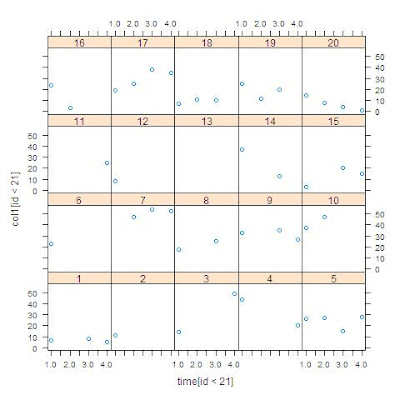
Suppose we wanted to plot CESD over time for each individual. While we show how to do this sort of thing in SAS (see section 5.6.2), it’s hard to do without SAS version 9.2. Instead, we recall it’s easy using the
lattice library in R (see section 5.2.2). But we need a ”long” data set with a row for each time point. This is the sort of data management one might prefer to do in SAS.
SASFirst, we read the data from a data set stored in SAS format. Then we use
proc transpose (section 1.5.3) to get the data into the required shape. Finally, we save the ”long” data set in Stata format (1.2.2).
libname k "c:\book";

proc transpose data=k.help out=ds1;
by id;
var cesd1 cesd2 cesd3 cesd4;
run;

proc print data = ds1 (obs = 5); run;

 Obs    ID    _NAME_    _LABEL_    COL1

   1     1    CESD1     1 cesd       7
   2     1    CESD2     2 cesd       .
   3     1    CESD3     3 cesd       8
   4     1    CESD4     4 cesd       5
   5     2    CESD1     1 cesd      11


proc export data=ds1 (rename=(_label_=timec1))
   outfile = "c:\book\helpfromsas.dta" dbms=dta;
run;
RIn R, we first read the file from Stata format (1.1.5), then
attach() it (section 1.3.1) for ease of typing. Then we check the first few lines of data using the
head() function (section 1.13.1). Noting that the time variable we brought from SAS is a character string, we convert it to a numeric variable using
as.numeric() (section 1.4.2) and
substr() (section 1.4.3). After loading the
lattice library, we display the series for each subject. In this, we use the syntax for subsetting observations (1.5.1) to keep only the first 20 observations and the
as.factor() function (1.4.10) to improve the labels in the output.
> library(foreign)
> xsas <- read.dta("C:\\book\\helpfromsas.dta")
> head(xsas)

  id _name_ timec1 col1
1  1  CESD1 1 cesd    7
2  1  CESD2 2 cesd   NA
3  1  CESD3 3 cesd    8
4  1  CESD4 4 cesd    5
5  2  CESD1 1 cesd   11
6  2  CESD2 2 cesd   NA

> attach(xsas)
> time <- as.numeric(substr(timec1, 1, 1))
> library(lattice)
> xyplot(col1[id < 21] ~ time[id < 21]|as.factor(id[id < 21]))
In the next entry, we'll reverse this process to manipulate data in R and produce the plot in SAS.


